

|
|
|
For the Federation Web Services application to work with ServletExec, specify Federation Web Services as a web application for ServletExec at the asserting and relying party.
Note: SOA Security Manager r12.1 SP3 is shipped with a ServletExec license key file named ServletExec_AS_6_license_key.txt. If you do not have this license key, contact CA Technical Support. From this license file, copy the license key and enter it in the ServletExec License dialog of the ServletExec Administration Console. For instructions on licensing ServletExec, see ServletExec documentation, available at the New Atlanta Communication website.
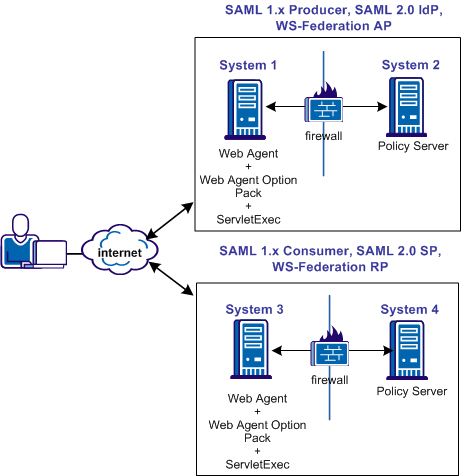
The following illustration shows a SOA Security Manager and ServletExec sample configuration. The illustration provides an example of how to use FWS in a sample federated environment.
ServletExec and the Web Agent Option Pack must be installed on the same web server where you installed the Web Agent.
Important! Apply the most current hot fixes for ServletExec. Without the hot fixes, Federation Web Services does not work with ServletExec. To obtain the hot fixes, go to the New Atlanta Communication website.
To set up ServletExec to work with FWS
The Manage Web Applications dialog opens.
Example:
C:\program files\ca\webagent\affwebservices
| Copyright © 2011 CA. All rights reserved. | Email CA Technologies about this topic |