Installation Guide › Architecture › Product Components
Product Components
Every CA RCM implementation includes the following functional components:
- The CA RCM server supports data import, certification campaigns, and the CA RCM web portal and web services.
- CA RCM client tools - the Data Management (DM) and Discovery and Audit (DNA) applications - let administrators manage data and develop the role hierarchy.
- The Workpoint Server application and the Workpoint Designer client support campaigns and other CA RCM business processes that are implemented using Workpoint workflows.
- Databases - CA RCM user, role, and resource databases, Workpoint processes, inbox data, and a reporting database.
The following diagram shows the interaction between these components.
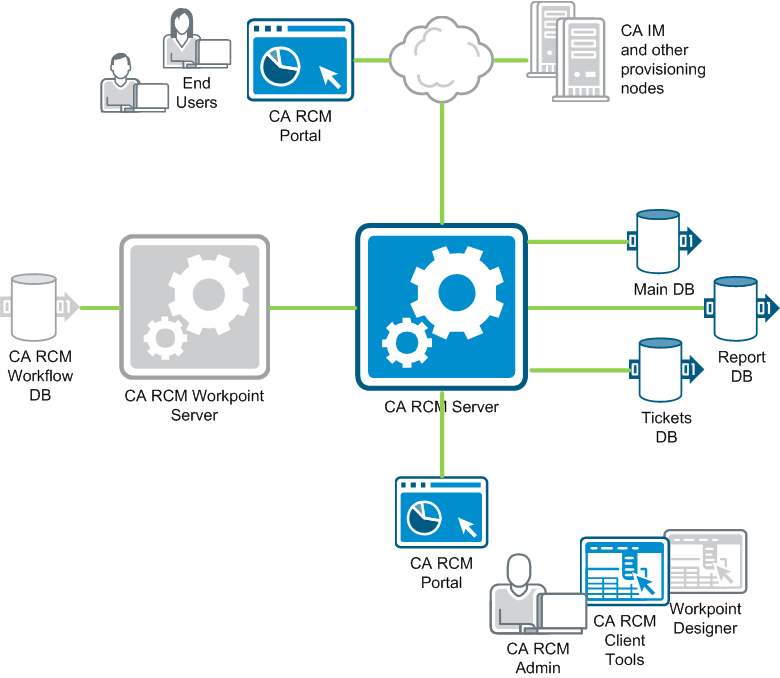
The CA RCM server application is the focal point of any CA RCM implementation. It handles various functions and queries, including:
- Automatically importing data from CA Identity Manager and other nodes, and support for web service calls
- Hosting the CA RCM web portal
- Conducting certification campaigns and other work flows through the CA RCM portal, using Workpoint processes and a ticket-based management system
The Workpoint server application processes ticket-based workflows such as certification campaigns. Typically a dedicated instance of Workpoint server is installed together with the CA RCM server, but an existing instance can be used.
The role engineer who administers CA RCM uses a set of applications:
- The CA RCM client tools are used to manage data import and to define the role-based permissions hierarchy.
- The Workpoint Designer client is used to load and modify Workpoint work flows.
- Additional management and configuration functions are exposed to administrators through the portal.

