

|
|
|
The following is a sample of the context menu (right-click) in the business Policy document window (working with Policy windows is described in chapter 10).
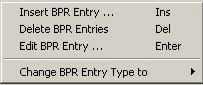
The following right-click controls enable editing BPR entries:
|
Name |
Menu Bar Location |
Shortcut |
Description in Section |
|
Insert BPR Entry |
Edit |
Ins |
|
|
Delete BPR Entry |
Edit |
Del |
|
|
Edit BPR Entry |
Edit |
Enter |
|
|
Change BPR Entry Type to |
- |
- |
|
| Copyright © 2010 CA. All rights reserved. | Email CA Technologies about this topic |