

|
|
|
This feature enables deleting one or more users, roles or resources records (depending how many are highlighted) from the Users Panel, Roles Panel or Resources Panel of a configuration. A message such as the following is displayed for each record:
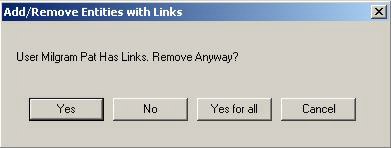
If more than one record is highlighted, CA RCM requests individual confirmation for each record to be removed from the original configuration. Note that all direct and indirect links to the highlighted record are removed along with the record. The Role Engineer can choose whether or not to delete the highlighted records all at once by clicking Yes to All.
Note: A deletion is not saved to memory. To perform a “Cut and Paste” action, first copy the desired item to its intended location and then delete it from its original location.
Note: Modifications to a configuration document are only final after a configuration file has been saved. If exited without saving, the configuration document reverts to its original state as before the deletion.
| Copyright © 2010 CA. All rights reserved. | Email CA Technologies about this topic |