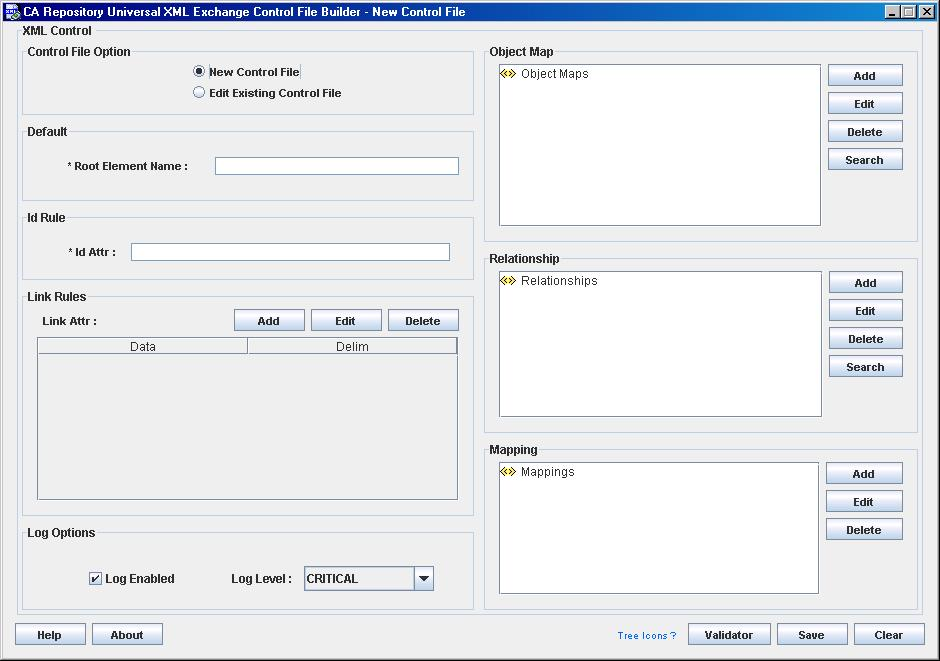
The CA Repository Universal XML Exchange Control File Builder dialog lets you perform tasks like creating a new control file or modifying an existing control file.
The following list explains each area of the CA Repository Universal XML Exchange Control File Builder dialog:
Creates a new control file or lets you edit an existing one.
Default: New Control File
Defines the root element name. The root element name is the name of the root element in the input XML file.
Note: A control file can have only one XML root element per input XML file.
Defines the name of the XML attribute that contains the unique value of an XML object in the XML file.
IdAttr identifies an XML attribute in the input file that is used to uniquely identify an XML element. In XML terminology, these attributes are known as ID attribute types. The value of the ID attribute must not appear more than once in an XML document. The CA Repository Universal XML Exchange requires that the elements within an XML document contain an ID attribute to build relationships between XML elements.
When you create a new control file, the ID attribute must contain a single XML element describing this unique ID. However, when you modify an existing control file, the ID attribute shows the text of IdAttr of the existing control file.
Note: The ID can be different for each XML object in the input XML file.
The name of the ID attribute must meet the XML standards for an XML name.
Adds or edits link attributes.
A link attribute describes an attribute that is used in the XML document to reference another XML element in the document. In XML terminology these attributes are usually known as IDREF attribute types. The value of the IDREF attribute must match the value of an ID attribute on an element elsewhere in the XML document. Attributes defined as IDREFS contain a list of ID values separated by whitespace. Link attributes must be established for IDREFS type attributes. The control file allows a delimiter other than spaces.
Note: You can add multiple link attributes.
Indicates whether the log is enabled and the level of the log.
Values: Critical, Error, Warning, Info
Default: Critical
Adds a new object map, modifies or deletes an existing object map, and searches for the objects, repository tables, or attributes you want to view or edit.
If you are creating a new control file, this area is empty. After you Map XML Objects to the repository entities, data appears in this area.
The Object Map area contains the following information about entities:
Note: If you loaded an existing control file, you can expand the selection list display by clicking the nodes.
Creates, changes, or deletes definitions that specify how objects in the repository are associated.
From this area you can add a new relationship, modify or delete a relationship, and search for the relationship.
You can perform the following tasks with the tree structure of relationships:
Note: You can use the Search button to locate objects, tables, and attributes.
Adds mapping for an object_map or a relationship to the control file. This mapping enables the conversion of input XML file data into values for entities of relationships or object_maps in preparation for uploading the file to the Repository.
The Mapping area contains a selection list of existing maps that contain the conversion values from the input XML file to the repository.
Using this area, you can select an element from which you create and add a new map, change the placement of an input XML control file's object in the repository, remove the map object from the control file.
The following controls are provided in the CA Repository Universal XML Exchange Control File Builder dialog:
Displays the CA Repository Universal XML Exchange Help - CA window.
Opens the About CA Repository Universal XML Exchange Control File Builder – CA dialog displaying the release number, copyright and license agreement information.
Displays a list of various tree icons and their description.
Opens the Validator dialog for control file.
Saves your new or modified control file.
Clears the data entered in the dialog.
| Copyright © 2009 CA. All rights reserved. | Email CA about this topic |