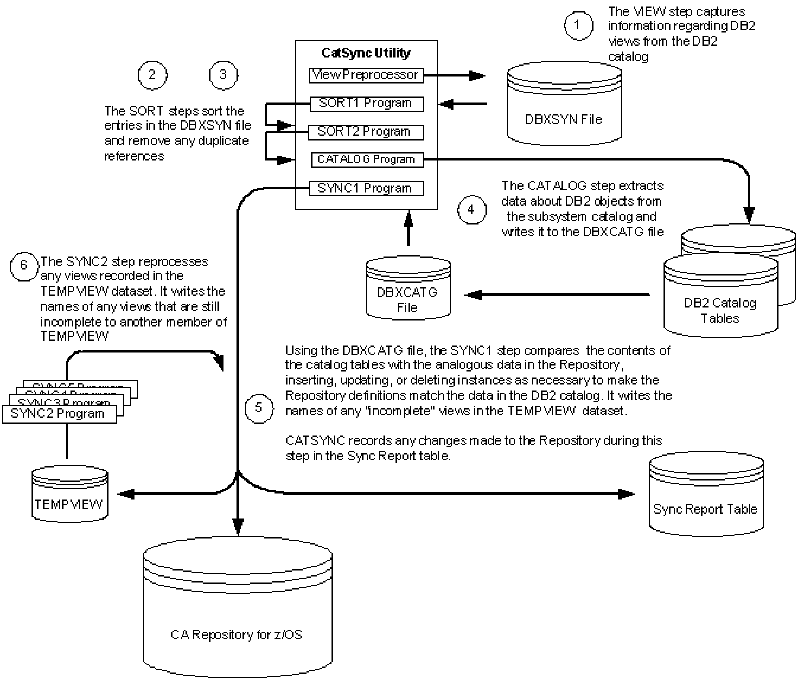
The JCL that runs CatSync includes the following JCL steps:
|
JCL Step |
Description |
|
View Preprocessor |
Analyzes all the databases, table spaces, tables, sequences, distinct data types and view definitions selected for processing, writing the names of related objects to the DBXSYN file. |
|
Sort 1 |
Sorts the DBXSYN file, eliminating duplicate entries. |
|
Sort 2 |
Completes sorting of the DBXSYN file. |
|
Catalog Scanner |
Extracts catalog information about the objects to be synched from the specified subsystem catalog, writing the catalog information to the DBXCATG file. |
|
Sync 1 |
Compares the object definitions in the DBXCATG file to those in the repository, inserting and updating repository instances as necessary. This step writes the names of any partial view definitions to the TEMPVIEW data set. |
|
Sync 2 |
Reprocesses views listed in the TEMP view data set, writing the names of any views that are still only partially defined to a new member of the TEMPVIEW data set. |
The following diagram outlines the basic steps of the Catalog Synchronization process.
| Copyright © 2009 CA. All rights reserved. | Email CA about this topic |