

|
|
|
Most of the time, the first step in creating a database application is creating a data model. In the data model, you specify how real-world entities are represented in a database.
With the project management application you are designing, the real-world entities map quite easily into database objects. The application tracks projects, the tasks that make up those projects, and the employees that are assigned to those tasks. Each of these is represented by one entity.
Note: Entity Attributes (EA) diagrams in CA Plex are a little bit different than they are in other applications. EA diagrams typically only display entities and their attributes, but in CA Plex, relationships between entities are also displayed.
In CA Plex, EA diagrams provide a visual representation of the entities that are stored in a database, their attributes, and the relationships between the entities. Diagrams enable you to visually communicate the specifics of an application to other developers or business analysts, and in some cases, to your end users.
The following example shows what your EA diagram will look like when you finish this chapter:
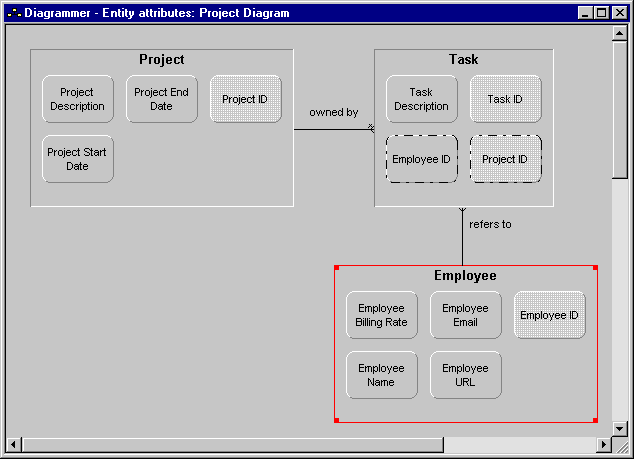
In diagrams, objects are represented by rectangles, rounded rectangles, and ovals. These objects are called nodes. A relationship between two objects is represented in one of two ways:
In the diagram, you will create two objects:
Together, two nodes, and the link between them, or a node and its sub-node, are equivalent to a triple in an CA Plex model. For example, you can see in the preceding graphic that the Project entity has four sub-nodes: Project ID, Project Description, Project Start Date, and Project End Date. These correspond to the following triples, which you created in the chapter "Defining Entities:"
Project known by Project ID
Project has Project Description
Project has Project Start Date
Project has Project End Date
When you define and change objects using the Diagrammer, your changes are reflected everywhere in the model (just as if you had used the Model Editor or another editor to make the changes). Similarly, if you delete a triple in the Model Editor, any corresponding links on diagrams are also removed. But the opposite is not true. If you delete a link using the Diagrammer, the triples created when you created the link are not deleted.
| Copyright © 2012 CA. All rights reserved. | Tell Technical Publications how we can improve this information |