

|
|
|
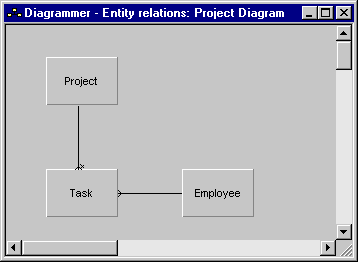
The tutorial reference model represents the model that you create when you do the tutorial. It has three entities: Project, Task, and Employee.
The three entities have relationships with each other. The Project entity owns the Task entity; when you delete a project, all of its tasks are deleted as well. The Task entity refers to Employee. This enables you to assign employees to tasks, but when tasks are deleted, the employees are not deleted.
The following shows the entity-relations diagram you created in the tutorial:
Here is a description of the three entities:
|
Entity |
Description |
Inherits From |
|
Project |
Stores information about projects in the Project ID, Project Description, Project Start Date, and Project End Date fields You define this entity in Defining the Project Entity in the chapter "Your First CA Plex Application in 20 Minutes." |
FOUNDATION/EditDetail |
|
Task |
Stores information about tasks for projects This entity is owned by the Project entity, so it stores the owning project’s key field, and data in the Task ID and Task Description fields. It refers to Employee, so it also stores the Employee’s key field. You define this entity in Defining the Task Entity in the chapter "Modeling Entity Relationships." |
FOUNDATION/EditDetail |
|
Employee |
Stores information about employees in the Employee ID, Employee Name, Employee Hire Status, and Employee Email Address fields You define this entity in Defining the Task Entity in the chapter "Modeling Entity Relationships." |
FOUNDATION/EditDetail |
The three entities store information in ten fields:
|
Field |
Description |
Inherits From |
|
Project ID |
The key field for projects. |
FIELDS/Identifier |
|
Project Description |
Stores free-text information about a project This field is set as optional. |
FIELDS/LongDescription |
|
Project Start Date |
Stores the start date and end date for a project. These fields are both set as optional. |
DATE/CheckedDateISO |
|
Project End Date |
||
|
Task ID |
The key field for tasks. |
FIELDS/Identifier |
|
Task Description |
Stores free-text information about a task. |
FIELDS/ShortDescription |
|
Employee ID |
The key field for employees. |
FIELDS/Identifier |
|
Employee Name |
Stores the name of the employee. |
FIELDS/ShortDescription |
|
Employee Hire Status |
Stores the hire status of the employee: full-time, part-time, or contract. |
FIELDS/Status |
|
Employee Email Address |
Stores the email address of the employee. |
FIELDS/ShortDescription |
The model has three unscoped functions:
|
Function |
Description |
Inherits From |
|
Project Wizard |
Enables end users to create projects and tasks for those projects. |
UISTYLE/FrameWizard |
|
Project Property Sheet |
Enables end users to maintain projects and tasks entered with the Project Wizard, to add new tasks, and to add and update employees. |
UISTYLE/FrameProperty |
|
Project Manager |
Displays three buttons to open the Project Wizard and the Project Property Sheet. |
UIBASIC/UIBasicShell |
| Copyright © 2012 CA. All rights reserved. | Tell Technical Publications how we can improve this information |