

|
|
|
So far, you have always tested the parts of the application you are building from within the CA Plex development environment. To deploy the application after you have finished it, you need to have an executable file.
To create an executable program:

Remember that earlier in this chapter, you added the triple Project Manager file name Projects. The Create Exe process uses that triple to determine the filename to create.
Note: By default this directory is C:\Program Files\CA\CA Plex r6.0\Tutorial\Gen\Release.
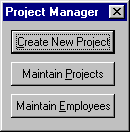
The Project Manager dialog appears:
| Copyright © 2012 CA. All rights reserved. | Tell Technical Publications how we can improve this information |