

|
|
|
You have created the Task entity but you have not specified anything else about it. In the next series of steps, you add triples to define the Task entity. After you have defined the Task entity, you learn more about the Panel Designer, and you use it to modify the inherited panels.
To define fields for the Task entity:
Task known by Task ID
Task has Task Description
Task ID is a FIELDS/Identifier
Task Description is a FIELDS/ShortDescription
These are similar to the triples you used to define the corresponding fields on the Project entity in the chapter "Your First CA Plex Application in 20 Minutes," except for the FLD length NBR triple. The FLD length NBR triple enables you to override the field length that you inherited from FIELDS/ShortDescription. This is a simple example of one of the ways you can customize the effects of a pattern library object.
Now that you have defined the fields for the Task entity, you need to specify which patterns you want the Task entity to inherit from.
To specify what pattern library objects the Task entity inherits from:
Task is a FOUNDATI/EditDetail
Task is a STORAGE/RelationalTable
Task is a FOUNDATI/OwnedCascade
You have already learned about the EditDetail and RelationalTable patterns, but the OwnedCascade entity is new.
OwnedCascade connects Task with a parent entity so that each record in the Task entity belongs to a record of the parent entity. When the parent entity that owns the Task records is deleted, the Task records are deleted as well. This is known as cascade deletion.
In the diagram, you added the relationship Task owned by Project, so Project is Task’s parent. The OwnedCascade pattern contains an abstract (placeholder) parent, called Owner, which you need to replace with a real owner entity.
Next, you replace the placeholder in the FOUNDATI/OwnedCascade pattern with the Project entity in your model.

The Template Editor appears:
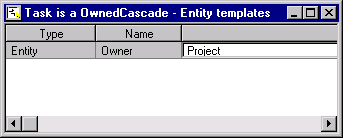
Task replaces FOUNDATI/Owner
…by Project

Notice that Task has another view called SuperKeys in addition to the Fetch and Update views inherited from EditDetail. The SuperKeys view stores the key fields of the owner of the entity—in this case, Project. Unlike Fetch and Update, SuperKeys does not have any scoped functions. Views are defined in CA Plex Object Types in the chapter “Your First CA Plex Application in 20 Minutes.” You learn more about them later in this chapter.
Now you have defined the Task entity. You have specified what pattern library entities it should inherit from, defined its fields, and the properties of the fields.
| Copyright © 2012 CA. All rights reserved. | Tell Technical Publications how we can improve this information |