

|
|
|
To show or hide the Object Browser, do the following:
Click the Show/Hide Browsers toolbar button (located on right end of the toolbar) to show or hide the Object Browser.

You can keep the Object Browser open while you work, and use it as a palette from which you can drag the objects you need. When it overlaps other CA Plex windows, it always appears on top.
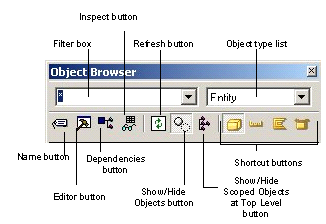
By default, the Object Browser shows you objects of one type at a time. You can see other objects if they are scoped by the main object type. For more information, see More About Scope. Notice that the Object Browser has shortcut buttons for displaying entities, fields, and functions. Setting the Object Browser to display functions only displays unscoped functions. Functions that are scoped by another object (such as an entity or a view) display when the Object Browser is focused on that object type. You can also select an object type to view from the object list.
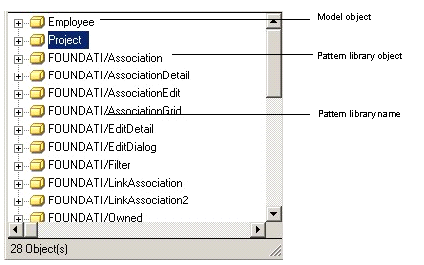
You can click the Show/Hide Library Objects toolbar button to show library objects.You can tell that an object is in a pattern library because, by default, it has the library name in front of the object name. For instance, the fourth entity in the preceding graphic is FOUNDATI/Association. This means that the entity Association comes from the FOUNDATION pattern library.

| Copyright © 2012 CA. All rights reserved. | Tell Technical Publications how we can improve this information |