

|
|
|
In this tutorial, you create a simple project management application. For our purposes, a project consists of a group of tasks, and each task has one employee assigned to it. The model contains three entities:
To save time, the Employee entity is already defined for you.
Here is an entity-relationship diagram of the application created in this tutorial. You will draw a diagram like this later.
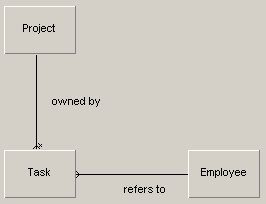
If you have worked with entity-relationship diagrams before, you can see that:
You can see all of this without having to look at any code. This diagram shows useful information, which CA Plex uses to generate the application.
For the purpose of this tutorial, this model is very basic. If you have developed real project management systems before, you may find parts of the model that you would design differently.
Even though it is a simple example, the end product is far from simple. In this tutorial, you create both a wizard and a property sheet to work with the project data. If you have built these in other design environments, you know that you would not be able to reuse much code from the wizard when creating the property sheet. However, CA Plex enables you to create a property sheet using the information you added to create the wizard, plus a few new lines of code.
| Copyright © 2012 CA. All rights reserved. | Tell Technical Publications how we can improve this information |