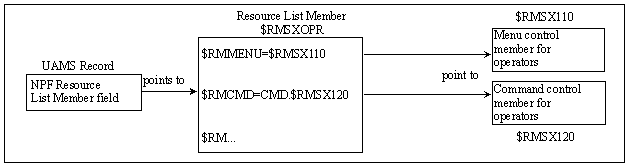
The Network Partitioning Facility (NPF) contains the access permissions for user's requests to menus, resources, or commands. This is enabled when an NPF resource list member is specified in a UAMS definition.
By specifying structured strings, access can be restricted or allowed to menu options, system images, commands, and Customizer parameter groups. These strings are stored in resource tables and referenced by the NPF resource list members. Resource tables and resource list members are read from the NPTABLE file.
The following diagram shows the relationship between UAMS and NPF.
The sample NPF members in the CC2DEXEC data set contain predefined tables that permit or restrict access for the supplied sample groups of users. These NPF members and their content are shown in the following table. For more information about these members, see the comments within the members.
Important! The NPF members must have names that start with $RMSX. If you rename a member, ensure that its name has the correct prefix.
Specifies permissions for administrators.
Specifies permissions for operators.
Specifies permissions for network operators.
Specifies permissions for monitors.
When a user accesses a menu, accesses a database record, or tries to issue a command, NPF is called. The region checks the NPF member specified in the user ID definition and its corresponding permissions. The region then responds by allowing or disallowing the requested action.
By using NPF, you can also restrict certain users to certain groups of resources. For example, one operator can influence all the resources in REGION1 only, while another operator can influence all the resources in REGION2. Any attempt by the first operator to influence the resources in REGION2 will be rejected.
Note: The region does not perform read access controls, so all users are able to browse data. Users who attempt to update data they are not authorized to update are presented with a warning message, and the data is not modified.
You can alter sample members to meet your own security requirements by changing the structured strings that are stored in the NPF resource tables. Following is a list of the NPF resource tables and the functions that can be secured by each.
Secures menu options.
Secures databases.
Secures system images.
Secures commands.
Secures Customizer parameter groups.
The rest of this section explains how to alter the NPF resource tables.
Important! Use the method documented here to control access to commands. Do not use the command authority function, because changing the authority level of commands can interfere with the operation of the region.
Access to menus and their options is controlled by using the $RMMENU table.
To allow access to all menu options, specify the following:
$RMMENU=*.*
To restrict access to menus and options, specify the following:
$RMMENU=$RMSXnnn
where $RMSXnnn is the control member for menu options for one user group. In this control member, you must list all the menus and menu options for the user group. Use the following format:
RM.menu-id.option-code
Identifies the menu. The ID of the main Primary Menu is $NM001. To display the ID of another menu, enter MENUID at the Select Option prompt.
Identifies the option (for example, A for the Administration and Definition option on the main Primary Menu).
To indicate that certain menu options are invalid, you must comment them by placing an asterisk (*) beside them. To make the menu option valid again, uncomment the option by removing the asterisk.
Access to the knowledge base is controlled by the $RMDB table. Controlling access to the knowledge base allows you to control the type of access a user has to definitions by systems, classes, and resources.
The type of access is controlled by specifying the actions that can be performed on systems, classes, and resources. If no restriction is required, specify the following:
$RMDB=ACT.*
To restrict the type of access allowed, specify the following:
$RMDB=ACT.$RMSXnnn
where $RMSXnnn is the control member for the type of access to databases for one user group. In this control member, you must list the actions that are available, and comment or uncomment them as required. The valid actions are CREATE, DELETE, and SET.
If all systems are to have the type of access defined above, specify the following:
$RMDB=SYS.*
To restrict the defined access to only certain systems, specify the following:
$RMDB=SYS.$RMSXnnn
where $RMSXnnn is the control member for systems with restricted access for one user group. In this control member, you must list the systems that will have the defined access.
If all classes are to have the type of access defined above, specify the following:
$RMDB=CLS.*
To restrict the defined access to only certain classes, specify the following:
$RMDB=CLS.$RMSXnnn
where $RMSXnnn is the control member for classes with restricted access for one user group. In this control member, you must list the available classes, their short names, and their description, and comment or uncomment them as required.
If all resources are to have the type of access defined above, specify the following:
$RMDB=RSC.*
To restrict the defined access to only certain resources, specify the following:
$RMDB=RSC.$RMSXnnn
where $RMSXnnn is the control member for resources with restricted access for one user group. In this control member, you must list the resources that will have the defined access.
Access to system images is controlled by the $RMSYS table.
To allow access to all system images, specify the following:
$RMSYS=SYS.*
To restrict access to certain system images, specify the following:
$RMSYS=SYS.$RMSXnnn
where $RMSXnnn is the control member for access to system images for one user group. In this control member, you must list the system images to which access is allowed.
Access to commands is controlled by the $RMCMD table. Access to the following groups of commands can be controlled:
It is also possible to restrict the commands that can be performed against systems and resources.
To allow access to all Automation Services commands, specify the following:
$RMCMD=CMD.*
To restrict access to particular Automation Services commands, specify the following:
$RMCMD=CMD.$RMSXnnn
where $RMSXnnn is the control member for access to Automation Services commands for one user group. In this control member, you must list the commands, their classes, and their descriptions, and comment or uncomment them as required.
To allow access to all system commands, specify the following:
$RMCMD=SYSCMD.*
To restrict access to particular system commands, specify the following:
$RMCMD=SYSCMD.$RMSXnnn
where $RMSXnnn is the control member for access to system commands for one user group. In this control member you must list the commands, their classes, and their descriptions, and comment or uncomment them as required.
To allow access to all product commands, specify the following:
$RMCMD=NMCMD.*
To restrict access to particular product commands, specify the following:
$RMCMD=NMCMD.$RMSXnnn
where $RMSXnnn is the control member for access to product commands for one group of users. In this control member, you must list the commands, their classes, and their descriptions, and comment or uncomment them as required.
If the commands defined above are to be issued against all systems, specify the following:
$RMCMD=SYS.*
To restrict the defined commands to only certain systems, specify the following:
$RMCMD=SYS.$RMSXnnn
where $RMSXnnn is the control member that controls the systems against which defined commands can be issued for one user group. In this control member, you must list those systems against which the defined commands can be issued.
If the commands defined above are to be issued against all resources, specify the following:
$RMCMD=RSC.*
To restrict the defined commands to only certain resources, specify the following:
$RMCMD=RSC.$RMSXnnn
where $RMSXnnn is the control member that controls the resources against which defined commands can be issued for one user group. In this control member, you must list those resources against which the defined commands can be issued.
When you issue a command from the OCS panel or command entry panel, you issue the command under the control of your command authority level and the external security profile of the region. You do not normally issue the command under the control of the NPF member specified in your UAMS record.
If you want to issue a command under the control of the specified NPF member, replace the command with an NCL procedure.
The following NCL procedures are provided to replace product commands:
If you must create other replacement NCL procedures, do the following:
-EXEC $RMSXTPL cmdname &ALLPARMS
&IF &RETCODE EQ 0 &THEN +
    -cmdname &ALLPARMS
CMDREPLS can contain up to 21 entries. If you have more than 21 entries, place the command SYSPARMS CMDREPL=cmdname for each extra entry in the NMINIT procedure.
Important! The NPF security rule, $RMCMD.REPLUNLD, controls whether a user can use the UNLOAD PROCEDURE command to unload the command replacement NCL procedures. Ensure that you provide sufficient security for the resource $RMCMD.REPLUNLD, to prevent unauthorized unloading (disabling) of the listed NCL procedures.
Access to all Customizer parameter groups is controlled by the $RMICS table.
To allow all types of access to Customizer parameter groups, specify the following:
$RMICS=*.*
To restrict the type of access to Customizer parameter groups, specify the following:
$RMICS=$RMSXnnn
where $RMSXnnn is the control member that controls the type of access to initialization parameter groups for one user group. In this control member, you must list the type of access, and the initialization and customization groups, and comment or uncomment them as required. Use the following format:
action.parameter-group-name
Specifies the type of access to the initialization and customization parameter groups. The access can be one or more of the following types:
Gets parameter group.
Files parameter group.
Actions parameter group.
Updates parameter group.
Browses parameter group.
Names the Customizer parameter group.
If you make changes to an NPF table, these changes are only activated when you have done the following: