Installing Your Product Using CA MSM › Acquiring Products › Update Software Catalog
Update Software Catalog
Initially, the CA MSM software catalog is empty. To see available products at your site, update the catalog. As new releases become available, update the catalog again to refresh the information. The available products are updated using the site ID associated with your CA Support Online credentials.
If you update the catalog tree and some changes are missing, check your CA Support Online user settings.
To update your software catalog
- Click the Software Catalog tab.
Note: The information on the Software Status tab for HIPERs and new maintenance is based on the current information in your software catalog. We recommend that you update the catalog on a daily or weekly basis to keep it current.
- Click the Update Catalog Tree link in the Actions section at the left.
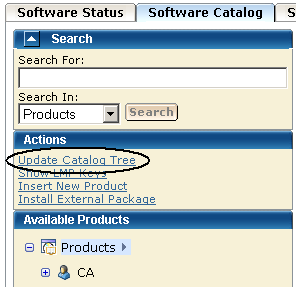
You are prompted to confirm the update.
- Click OK.
A dialog opens that shows the progress of the task. When the task completes, you can click Show Results on the Progress tab to view the details of the actions. Click Close to return to the previous page.
Note: While a task is in progress, you can perform other work. You can click Hide to exit the dialog and view the task status later at the Tasks tab.
Copyright © 2010 CA.
All rights reserved.