Using SmartTrace › View a Trace
View a Trace
You can view a packet trace from the following locations:
- From the IP Resource Monitor, IP Node Monitor, or connection list (after activating a trace with the PT command)
- From the Packet Tracing Menu through a list of packet tracing definitions
The trace provides information about the flow of packets and helps you diagnose network problems.
Note: The data displayed depends on your security access. For more information, see your Security Administrator.
The following examples show how traces can help you identify conditions that can contribute to poor response time.
Example: Packet Fragmentation
If a packet is too large and becomes fragmented, it needs to be reassembled at the destination. The process of fragmentation and reassembly can contribute to poor response time.
If a packet has been fragmented, it is indicated under the Summary Information column on the Packet List panel.
 PROD---------------------- SmartTrace : Packet List ---------------------------
 Command ===>                                                   Scroll ===> CSR

                                                                S/V=View P=Print
     Definition UDP2
     Stack .... TCPIP11                     Total Traced 32
     Local Port 8011
     Protocol   UDP

          Local Host      Dir Foreign Host    Port   +Time  Bytes  Summary Infor
     0008 192.168.65.11    -> 192.168.65.31   32317 <0.001   1492   (Frag)
     0009 192.168.65.11   <-  192.168.65.31   32317  4.005   1492   (Frag)
     0010 192.168.65.11    -> 192.168.65.31   32317 <0.001   1492   (Frag)
Example: Retransmissions
When packets are lost, the lost segment or segments are retransmitted. Retransmissions can contribute to poor response time.
One way that TCP detects packet loss relies on the fact that when an out-of-order segment is received, the receiver generates a duplicate acknowledgement for the highest in-order data byte received. A single duplicate acknowledgement is not a reliable indicator of packet loss because the packets may have been delivered, but not in the original order. TCP distinguishes between these cases by using three duplicate acknowledgements as an indicator of packet loss. When the sending TCP receives the third duplicate acknowledgement, it retransmits the segment referenced by the duplicate ACK number. This is referred to as fast retransmission.
In the following example, the segment with relative sequence number (RelSeq) 1419406 was lost. Packet numbers 1522 through 1524 are duplicate acknowledgements of all data up to the segment with relative sequence number 1419406. Packet number 1524, being the third duplicate acknowledgement, triggers fast retransmission, and packet number 1525 is the retransmission of the segment.
 PROD---------------------- SmartTrace : Packet List ---------------------------
 Command ===>                                                   Scroll ===> CSR

                                                                S/V=View P=Print
     Definition FTP
     Stack .... TCPIP11                     Total Traced 1697
     Local Host 192.168.65.11          <--> Foreign Host 192.168.135.39
     Local Port 20                          Foreign Port 4177
     Protocol   TCP

          Dir  +Time  Bytes  Summary Information
     1520  -> <0.001   1492  Ack Psh Win=32768 RelSeq=1482061 RelAck=1 TimeStamp
     1521 <-   0.043     52  Ack     Win=64095 RelSeq=1 RelAck=1419406 TimeStamp
     1522 <-   0.007     52  Ack     Win=64095 RelSeq=1 RelAck=1419406 TimeStamp
     1523 <-   0.007     52  Ack     Win=64095 RelSeq=1 RelAck=1419406 TimeStamp
     1524 <-   0.008     52  Ack     Win=64095 RelSeq=1 RelAck=1419406 TimeStamp
     1525  -> <0.001   1492  Ack Psh Win=32768 RelSeq=1419406 RelAck=1 TimeStamp
Example: Window Size to Receive Data
Each end of a TCP connection advertises a window size that specifies the size of the buffer that is available to receive data. The size changes as data is moved into or out of the buffer. If the receiver advertises a window size of 0 (a closed window), it stops the data transfer. Closed windows can contribute to poor response time.
When a window is closed, a subsequent TCP segment must be sent to open the window by advertising a nonzero window size.
In the following example, the local end of the connection advertises a window size of 4096 in packet number 0309. After receiving three data packets (0312 through 0314) with a total of 4096 data bytes (excluding the headers), it closes the window with packet number 0315. After a short delay, the local application apparently received 2048 bytes of data, freeing up some local buffer space. The window is reopened with packet number 0317 that advertises a window size of 2048.
 PROD---------------------- SmartTrace : Packet List ---------------------------
 Command ===>                                                   Scroll ===> CSR

                                                                S/V=View P=Print
     Definition TCP1
     Stack .... TCPIP11                     Total Traced 334
     Local Host 192.168.65.11
     Local Port 8011
     Protocol   TCP

          Dir Foreign Host    Port   +Time  Bytes  Summary Information
     0309  -> 192.168.65.31   3375  <0.001     52  Ack Psh Win=4096 Seq=25131163
     0310 <-  192.168.65.31   3375   0.001     52  Ack Psh Win=6144 Seq=56108795
     0311 <-  192.168.65.31   3375  <0.001     52  Ack Psh Win=8192 Seq=56108795
     0312 <-  192.168.65.31   3375  <0.001   1492  Ack     Win=8192 Seq=56108795
     0313 <-  192.168.65.31   3375  <0.001   1492  Ack     Win=8192 Seq=56108939
     0314 <-  192.168.65.31   3375  <0.001   1268  Ack Psh Win=8192 Seq=56109083
     0315  -> 192.168.65.31   3375  <0.001     52  Ack Psh Win=0 Seq=2513116335
     0316  -> 192.168.65.31   3375  <0.001   1076  Ack Psh Win=0 Seq=2513116335
     0317  -> 192.168.65.31   3375  <0.001   1076  Ack Psh Win=2048 Seq=25131173
View a Trace from a Resource or a Connection
After you have started a trace, you can view the traced packets.
To view a trace from a resource or a connection, enter PTV next to the resource or connection.
The SmartTrace : Packet List appears.
View a Trace from the Packet Tracing Menu
The Packet Tracing Menu lets you list running or saved traces, which you can view.
To view a trace from the Packet Tracing Menu
- Enter /IPPKT at the prompt.
The Packet Tracing Menu appears.
- Select the option for the type of definitions that you want to display.
The SmartTrace : Packet Trace Definitions panel appears.
- Position your cursor next to the definition for the packet trace you want to view, and press Enter.
The definition expands to list the packet traces.
- Enter V (View) or S next to the packet trace.
The SmartTrace : Packet List appears, listing the packets in the trace.
Note: If authorized, you can enter the EE command at the Command prompt to view UDP packets as EE packets.
- (Optional) Enter PRINTLIST at the Command prompt to print the packets list.
Locate Packet Data
On a Packet List panel, you can tag packets that contain the data you want to find. You use the TAG command to specify the data you want to locate. The command searches the content of the packets (excluding the IP header) for the specified data. The packets in which the data is located are identified by a TAG flag. You can then use the FIND command to find these flags to locate those packets.
To locate packet data in the listed packets
- Enter TAG.
The TAG Command Prompt panel appears.
- Specify the data you want to locate, and then press F6 (Action).
Packets that contain the specified data are tagged, for example:
     0003 192.168.65.11   2859  <-  192.168.65.61   1817   0.001     82  Ack Psh
     0004 192.168.65.11   3001  <-  172.24.122.222  4607   0.009     50  Ack Psh
     TAG* 192.168.65.11   3001   -> 172.24.122.222  4607   0.009   1492  Ack
     TAG2 192.168.65.11   3001   -> 172.24.122.222  4607  <0.001   1456  Ack Psh
     0007 192.168.65.11   7005  <-  172.31.9.182    2347   0.147     48  Syn
- Use the FIND command to find the tags:
- TAGn
Indicates that the packet contains the data string specified by the nth tag.
- TAG+
Indicates that the packet contains some of the data strings to be located.
- TAG*
Indicates that the packet contains all the data strings to be located.
To clear selected tags, enter TAGCLR and select the tags to clear.
To clear all tags, enter TAGCLR ALL or press F3 (Exit) to exit the Packet List panel.
Decode Packet Data for Specific Protocols and Ports
Decoding interprets the packet contents according to the specific protocol and application. When a packet is decoded, its data is broken down into individual elements (for example, commands and flags). Whenever possible, the meaning of each element is displayed in readable text. When a packet is not decoded, its data is displayed in hexadecimal dump format with the corresponding EBCDIC and ASCII translations.
TCP packets on the ports specified in the SMARTTRACE parameter group are decoded. The following protocols are decoded:
- Distributed Relational Database Architecture (DRDA)
- FTP
- HTTP
- Simple Object Access Protocol (SOAP) (through HTTP ports)
- Telnet
In addition to this decoding, you can enter the DECODE command on a Packet List panel to decode TCP packet data for other DRDA, FTP, HTTP, and Telnet ports. Decoding applies to the current session. If you exit the panel and then reenter it, enter the command again to perform specific decoding.
Packets that use the following protocols are also decoded by default:
- Enhanced Interior Gateway Routing Protocol (EIGRP)
- Generic Routing Encapsulation (GRE)
- Internet Control Message Protocol (ICMP)
- Internet Group Management Protocol (IGMP)
- IPSec
- Open Shortest Path First Interior Gateway Protocol (OSPFIGP)
- Transport Layer Security (TLS) and Secure Sockets Layer (SSL) handshake
- User Datagram Protocol (UDP) (for Enterprise Extender data only)
Note: Only data packets with header information are decoded. If the data spans multiple packets, only the first packet is decoded.
To decode packet data for other ports
- Enter DECODE.
The DECODE Command Prompt panel appears.
- Specify the port number for the ports you want to decode, and press F6 (Action).
A message appears, indicating that ports are defined for decoding. Part of the decoded information appears under Summary Information.
- Enter S next to a decoded packet to view all the decoded information.
The Formatted Packet Display panel appears, showing the decoded information.
After you specify the decoding of certain ports, you can disable their decoding for the currently listed packets by server port type.
To disable the decoding of user-specified ports for a server type, enter DECODE server_port_type OFF.
Note: For more information about the syntax of the command, see the online help.
Example: Decoding of Packets on Port 21
The following example shows the decoding of Port 21:
     Definition FTP31
     Stack .... TCPIP11                     Description  USER001 FTP
     Protocol   TCP

          Local Host      LPort Dir Foreign Host    Port   +Time  Bytes  Summary
     0001 192.168.65.11   1433   -> 192.168.65.31   21         -     78  Req: PO
     0002 192.168.65.11   1433  <-  192.168.65.31   21    <0.001     74  Rsp: 20
     0003 192.168.65.11   1433   -> 192.168.65.31   21    <0.001     58  Req: NL
     0004 192.168.65.11   1471  <-  192.168.65.31   20     0.092     60  Syn
     0005 192.168.65.11   1471   -> 192.168.65.31   20    <0.001     60  Ack Syn
     0006 192.168.65.11   1471  <-  192.168.65.31   20    <0.001     52  Ack
     0007 192.168.65.11   1433  <-  192.168.65.31   21    <0.001     73  Rsp: 12
     0008 192.168.65.11   1471  <-  192.168.65.31   20    <0.001     84  Ack Psh
     0009 192.168.65.11   1471  <-  192.168.65.31   20    <0.001     52  Ack Psh
     0010 192.168.65.11   1471   -> 192.168.65.31   20    <0.001     52  Ack
     0011 192.168.65.11   1471   -> 192.168.65.31   20    <0.001     52  Ack Psh
     0012 192.168.65.11   1471  <-  192.168.65.31   20    <0.001     52  Ack Psh
     0013 192.168.65.11   1433   -> 192.168.65.31   21     0.214     52  Ack Psh
          Summary Information
     0001 Req: PORT 141,202,65,11,5,191
     0002 Rsp: 200 Port request OK.
     0003 Req: NLST
     0004 Syn     Win=65535 Seq=3986067402 MaxSeg=1452 WScale=3 TimeStamp
     0005 Ack Syn Win=65535 Seq=1354158791 Ack=3986067403 MaxSeg=1452 WScale=3
     0006 Ack     Win=32768 Seq=3986067403 Ack=1354158792 TimeStamp
     0007 Rsp: 125 List started OK
     0008 Ack Psh Win=32768 Seq=3986067403 Ack=1354158792 TimeStamp
     0009 Ack Psh Fin Win=32768 Seq=3986067435 Ack=1354158792 TimeStamp
     0010 Ack     Win=32768 Seq=1354158792 Ack=3986067436 TimeStamp
     0011 Ack Psh Fin Win=32768 Seq=1354158792 Ack=3986067436 TimeStamp
     0012 Ack Psh Win=32768 Seq=3986067436 Ack=1354158793 TimeStamp
     0013 Ack Psh Win=32747 Seq=1351125108 Ack=3978318867 TimeStamp
Packets 1 through 3 and 7, which use Port 21, are decoded.
Packets 4 through 6 and 8 through 12, which do not use Port 21, are not decoded.
Packet 13, which uses Port 21, is not decoded because it contains no data.
DRDA Packets
IBM's DB2 distributed database functionality is based on DRDA. Decoded DRDA packets help application programmers and network analysts who have limited knowledge of DB2 to diagnose problems.
The SMARTTRACE parameter group specifies the ports to decode. You can also use the DECODE command to specify ports on demand.
On the 3270 interface, you can use the following primary commands to change the contents in the Summary Information column:
- SQLVIEW
(Default view) Displays the SQL commands and responses in a DRDA packet. If there is no SQL information, the Distributed Data Management (DDM) commands and responses are shown.
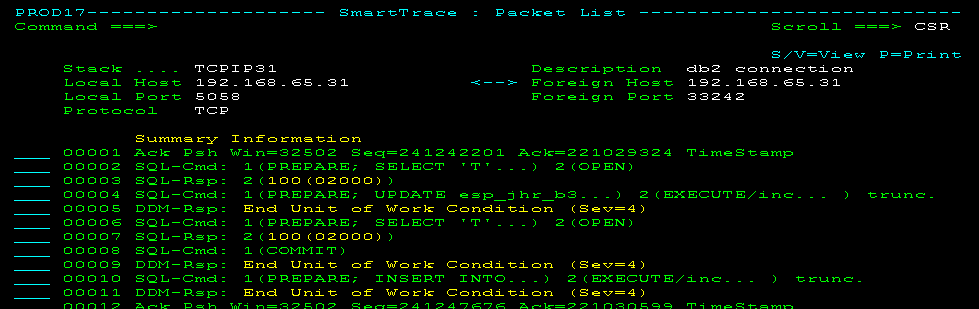
This view is useful for troubleshooting SQL application issues. When a response shows an SQL status code, you can display an explanation of the code using the SQL line command.
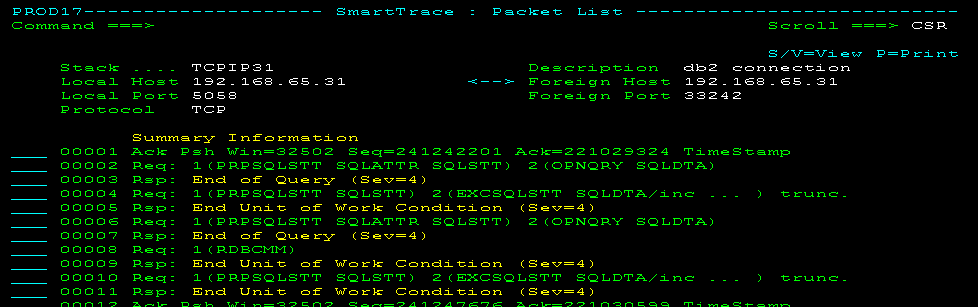
- DDMVIEW
Displays only the DDM commands and responses in a DRDA packet. This view requires knowledge of the DRDA command set. The following panel shows the previous example in DDM view:
IPSec Packets
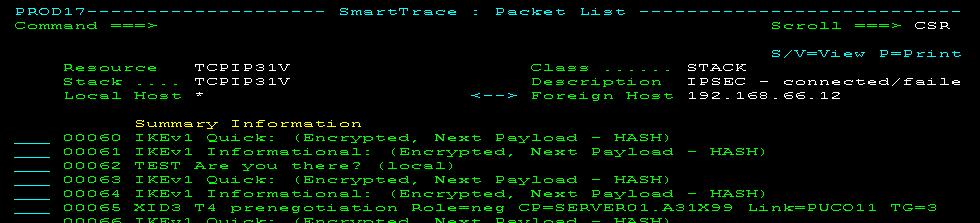
Decoded IPSec packets help network analysts diagnose IPSec problems, for example, error during IKE negotiations.
The following example shows IKE negotiations during the establishment of an Enterprise Extender (EE) connection:
TLS and SSL Handshake Packets
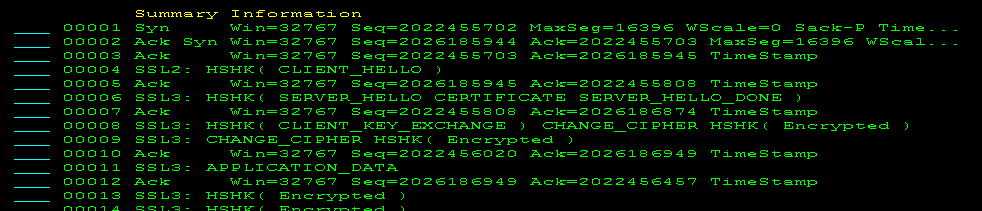
Decoded TLS and SSL handshake packets help network analysts diagnose problems during the negotiations between two applications to establish connection.
The following example shows a typical negotiation:
SOAP Packets
Decoded SOAP packets help network analysts diagnose problems. By reviewing the decoded data, you can easily identify requests that have failed and gain understanding of the data flow that transpires during a web service exchange.
Decoding is limited to HTTP as the underlying protocol for transporting SOAP messages.
The following example shows an error condition:
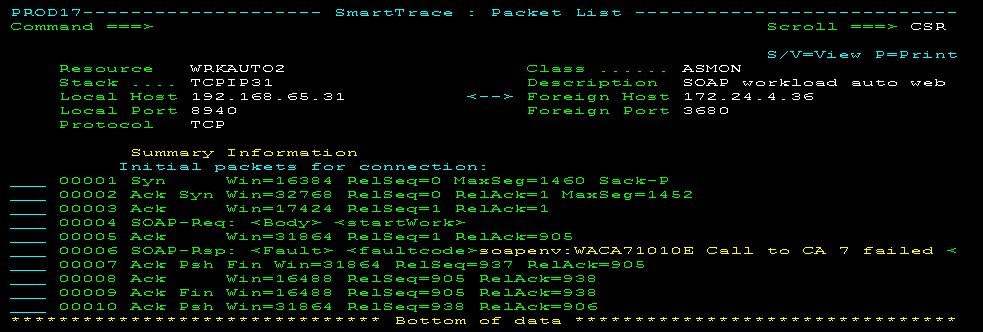
Typically, SOAP packets are segmented. You can view the reassembled packets using data flow reports.
Hide Decoded Information from the Packet List
During diagnosis, you may want to see the summary information about TCP instead of the decoded FTP, HTTP, and Telnet ports. For example, you may want to find out about the window sizes and sequence numbers across a number of packets. The TCPSUMM command lets you hide any decoded information temporarily on the Packet List panel.
To hide decoded information from the packet list, enter TCPSUMM at the Command prompt.
To redisplay the decoded information, press F6 (Refresh).
View Packet Data
From Packet List, you can view the details of a packet. You can view the details in different formats.
To view the packet data
- Enter V (View) or S beside the packet that you want to view.
The details appear.
Note: To view the actual data in a packet, you must have authority.
- (Optional) Press F6 (Format) to cycle through the formats.
The format of the displayed details changes.
Formatted Packet Display
The contents of the Formatted Packet Display vary according to the type of packet and its contents. There are three display formats for the Formatted Packet Display. You can move between the three display formats by pressing F6 (Format).
Format A
PROD------------------ TCP/IP : Formatted Packet Display -------Columns 001 079
Command ===>                                                   Scroll ===> PAGE
********************************* TOP OF DATA *********************************
PKT  Packet # ..... 00000002     Direction .........  Recv
     Date ......... 19-SEP-2006  Time ..............  10:16:58.408203
     Link Name .... OSATR0
IP   Source Addr ..... 10.16.91.126    Destination Addr ... 10.16.77.25
     IP Version ...... 4               Header Length ...... 5
     Type of Service . B'00000000'     Total Length ....... 40
     Identification .. 47203           Flags .............. B'010'
     Frag Offset ..... 0               Time To Live ....... 125
     Protocol ........ TCP             Header Chksum ...... X'0BD4'
TCP  Src Port ........ 2336            Dest Port ... TELNET
     Seq Number ...... X'F9F3F6F5'     Ack Number .. X'F6F8F3F4'
     Data Offset ..... 20              Flags ....... ACK
     Window .......... 8638            Checksum .... X'C06C'
     Urgent Pointer .. 0
Format B
PROD----------------- TCP/IP : Formatted Packet Display -------Columns 001 079
Command ===>                                                  Scroll ===> PAGE
********************************* TOP OF DATA ********************************
PKT  Packet # ..... 00000002     Direction .........  Recv
     Date ......... 19-SEP-2006  Time ..............  10:16:58.408203
     Link Name .... OSATR0
IP   Source Addr ..... 10.16.91.126    Destination Addr ... 10.16.77.25
     IP Version ...... 4               Header Length ...... 5
     Type of Service . B'00000000'     Total Length ....... 40
     Identification .. 47203           Flags .............. B'010'
     Frag Offset ..... 0               Time To Live ....... 125
     Protocol ........ TCP             Header Chksum ...... X'0BD4'
          +----------- IP Header -----------+ +--- EBCDIC ---+ +---  ASCII ---+
    +0000 45000028 B8634000 7D060BD4 C7005B7E         '  MG $= E  ( c@ }      ~
    +0010 C7005019                            G &                P
TCP  Src Port ........ 2336            Dest Port ... TELNET
     Seq Number ...... X'F9F3F6F5'     Ack Number .. X'F6F8F3F4'
     Data Offset ..... 20              Flags ....... ACK
Format C
********************************* TOP OF DATA *********************************
PKT  Packet # ..... 00000002     Direction .........  Recv
     Date ......... 19-SEP-2006  Time ..............  10:16:58.408203
     Link Name .... OSATR0

          +-------- IP Header Data ---------+ +--- EBCDIC ---+ +---  ASCII ---+
    +0000 45000028 B8634000 7D060BD4 C7005B7E         '  MG $= E  ( c@ }      ~
    +0010 C7005019                            G &                P

          +------------ IP Data ------------+ +--- EBCDIC ---+ +---  ASCII ---+
    +0000 09200017 28BCF407 37D33643 501021BE       4  L  &        (   7 6CP !
    +0010 C06C0000                            {%                l
****************************** BOTTOM OF DATA *********************************
Note: For more information about the information displayed, see the Request for Comments (RFC) for the protocol being used:
- RFC 791 for IP
- RFC 793, RFC 1323, and RFC 2018 for TCP
- RFC 768 for UDP
- RFC 792 for ICMP
The Formatted Packet Display shows several groups of data. Some of these groups of data are displayed in only one format of the panel; others are displayed in two or three of the formats.
Each group of data relates to one of the following:
- The packet as a whole
- IP
- The related protocol (TCP, UDP, or ICMP)
The following table identifies the groups of data displayed in the different formats:
|
Format
|
Data Displayed
|
|
A
|
Packet details
IP header fields
IP options
Protocol header fields
Protocol data
|
|
B
|
Packet details
IP header fields
IP options
IP header
Protocol header fields
Protocol header data
Protocol data
|
|
C
|
Packet details
IP header
IP data
|
Packet Details on the Formatted Packet Display
Packet details are displayed in all three formats of the Formatted Packet Display.
PKT  Packet # ........ 00000002        Direction .........  Send
     Date ............ 12-Mar-2006     Time ..............  15:32:09.456064
     Link Name ....... IUCVLNK
IP Header Fields on the Formatted Packet Display
The IP header fields for the packet are displayed in Format A and Format B of the Formatted Packet Display.
     IP Version ...... 4               Header Length ...... 5
     Type of Service . B'00000000'     Total Length ....... 472
     Identification .. 22900           Flags .............. B'000'
     Frag Offset ..... 0               Time To Live ....... 60
     Protocol ........ UDP             Header Chksum ...... X'D555'
IP Options on the Formatted Packet Display
For some packets, there is a group of items displayed as IP options in Format A of the Formatted Packet Display.
     OPTION=COPY   CONTROL  LOOSE_SRC LEN=11 PTR=4
            1.2.3.4
            5.6.7.8
     OPTION=NOCOPY CONTROL  END_LIST
Note: For more information about IP options, see RFC 791.
Protocol Header Fields on the Formatted Packet Display
Protocol header fields are displayed in Format A and Formt B of the Formatted Packet Display. The header displayed depends on the protocol: TCP, UDP, or ICMP.
TCP Header Fields on the Formatted Packet Display
TCP  Src Port ........ TELNET          Dest Port ... 3355
     Seq Number ...... X'F9F3F6F5'     Ack Number .. X'F6F8F3F4'
     Data Offset ..... 20              Flags ....... ACK PSH
     Window .......... 1853            Checksum .... X'6981'
     Urgent Pointer .. 0
UDP Header Fields on the Formatted Packet Display
UDP  Src Port ........ 53              Dest Port ... 1173
     Length .......... 94              Checksum .... X'BE47'
ICMP Header Fields on the Formatted Packet Display
ICMP Msg Type ............... Echo Request
     Code ................... 0
     Checksum ............... X'7A94'
     Identifier ............. 12
     Sequence Number ........ 0
TCP Options on the Formatted Packet Display
For some packets, there is a group of items displayed as TCP options in Format A of the Formatted Packet Display.
 TCP Option               Value
 ----------               -----
 Maximum Segment Size     255
 No Operation
 End Of Options List
Protocol Data on the Formatted Packet Display
Protocol data appears in Format A and Format B of the Formatted Packet Display. Protocol header data appears in Format B only.
The details displayed depend on the protocol: TCP, UDP, or ICMP. The packet's data is displayed in three columns in different representations: hexadecimal, EBCDIC, and ASCII.
TCP Data on the Formatted Packet Display
          +----------- TCP Data ------------+ +--- EBCDIC ---+ +---  ASCII ---+
    +0000 3C404000 13114040 2902C0E8 42F5E2E3           {Y 5ST <@@   @@)   B
    +0010 D5D4F13C 40616029 02C0E842 F5E2A385 AB1  /-  {Y 5Abc    <@a)   B
    +0020 8740E296 12A3A456 12345678 C0E842F5 g Software  {Y 5  @        )   B
    +0030 3CC15060 11C15029 02C0E842 F23CC260  A&- A&  {Y 2 B- < P P)   B <
    +0040 4011C260 2902C0F0 42F43CC2 E6402902   B-  {0 4 BW    @  )   B <  @)
    +0050 C0E842F7 4E3CC27D 604E3CC3 12345678 {Y 7+ B'-+ C-      B N< }< @)
    +0060 C0F042F4 D3E44040 12345678 C0E842F7 {0 4LU      {Y 7   B   @@@@)   B
    +0070 D5D5D5D5 D5F0F0F2 11C3F029 02C0F042 aaaaa002 C0  {0             )   B
    +0080 F43CC3F6 402902C0 E842F74F 3CC4C67E 4 C6   {Y 7| DF=  <  @)   B O<  ~
    +0090 3CC44D40 4F3CC4D6 402902C0 F042F1D6  D( | DO   {0 1O < M@O<  @)   B
    +00A0 2902C0E8 42F7D629 02C0E842 F2D62902   {Y 7O  {Y 2O   )   B  )   B  )
TCP Header Data on the Formatted Packet Display
          +-------- TCP Header Data --------+ +--- EBCDIC ---+ +---  ASCII ---+
    +0000 00170D1B 0DBC6D44 0DA807C4 5018073D       _  y D&          mD    P  =
    +0010 69810000                       a                 i
UDP Data on the Formatted Packet Display
          +----------- UDP Data ------------+ +--- EBCDIC ---+ +---  ASCII ---+
    +0000 00018580 00010001 00000000 02353302   e                           53
    +0010 12345678 12345678 07696E2D 61646472           > /    90 0 192 in-addr
    +0020 04617270 6100000C 0001C00C 000C0001  /  /     {       arpa
    +0030 0000D141 12345678 616E796D 65646502   J     />_        A   ganymede
    +0040 12345678 03313939 07696E2D 61646472           > /    90 0 192 in-addr
    +0050 04617270 6100                        /  /             arpa
UDP Header Data on the Formatted Packet Display
          +---------- UDP Header -----------+ +--- EBCDIC ---+ +---  ASCII ---+
    +0000 00350495 005EBE47                      n ;            5    G
ICMP Data on the Formatted Packet Display
          +----------- ICMP Data -----------+ +--- EBCDIC ---+ +---  ASCII ---+
    +0000 48B63B8B 1A1F56FF 10111213 14151617                  H ;   V
    +0010 18191A1B 1C1D1E1F 20212223 24252627                           !"#$%&'
    +0020 28292A2B 2C2D2E2F 30313233 34353637                  ()*+,-./01234567
    +0030 38393A3B 3C3D3E3F 40414243 44454647                  89:;<=>?@ABCDEFG
    +0040 48494A4B 4C4D4E4F 50515253 54555657   ¢.<(+|&        HIJKLMNOPQRSTUVW
    +0050 58595A5B 5C5D5E5F 60616263 64656667   !$*);-/       XYZ  _
    +0060 68696A6B 6C6D6E6F 70717273 74757677   <x:ad>,%_>?   hijklmnopqrstuvw
    +0070 78797A7B 7C7D7E7F 80818283 84858687  :#@'=" abcdefg xyz{<x:ad>}~
    +0080 88898A8B 8C8D8E8F 90919293 94959697 hi       jklmnop
    +0090 98999A9B 9C9D9E9F A0A1A2A3 A4A5A6A7 qr       ~stuvwx
    +00A0 A8A9AAAB ACADAEAF B0B1B2B3 B4B5B6B7 yz
ICMP Header Data on the Formatted Packet Display
          +---------- ICMP Header ----------+ +--- EBCDIC ---+ +---  ASCII ---+
    +0000 08007A94 000C0000                     :m               z
IP Data on the Formatted Packet Display
          +------------ IP Data ------------+ +--- EBCDIC ---+ +---  ASCII ---+
    +0000 00170D1B 0DBC6D44 0DA807C4 5018073D       _  y D&          mD    P  =
    +0010 12345678 01C21140 40290142 F4114040  a   B      4    i      @@) B  @@
    +0020 3C404000 12345678 2902C0E8 42F5E2E3           {Y 5ST <@@   @@)   B
    +0030 D5D4F13C 12345678 02C0E842 F5E2A385 XX1  /-  {Y 5Abc    <@a)   B
    +0040 12345678 8740E296 86A3A681 12345678 defgh Software        @        )
    +0050 C0E842F5 3CC15060 11C15029 02C0E842 {Y 5 A&- A&  {Y    B < P P)   B
    +0060 F23CC260 4011C260 2902C0F0 42F43CC2 2 B-  B-  {0 4 B  < @  )   B <
    +0070 E6402902 C0E842F7 4E3CC27D 604E3CC3 W   {Y 7+ B'-+ C  @)   B N< }<
    +0080 60402902 C0F042F4 D3E44040 40402902 -   {0 4LU       @)   B   @@@@)
    +0090 C1E234F5 D5D5D5D5 D5F0F0F2 11C3F029 {Y 7aaaaa002 C0    B            )
    +00A0 02C0F042 F43CC3F6 402902C0 E842F74F  {0 4 C6   {Y 7|    B <  @)   B O
IP Header Data on the Formatted Packet Display
          +----------- IP Header -----------+ +--- EBCDIC ---+ +---  ASCII ---+
    +0000 450004D8 721C0000 3C06A9AB C7005019    Q      z G &  E   r   <     P
    +0010 C700803E                            G                   >
Print Packet Data
Both the Packet List panel and the Formatted Packet Display panel let you print the data in a packet..
To print packet data from Packet List
- Enter P (Print) beside the packet that you want to print.
The Confirm Printer panel appears.
- Specify your printing requirements, and press F6 (Confirm).
The packet details are printed.
To print packet data from Formatted Packet Display
- Enter PRINT at the Command prompt.
The Confirm Printer panel appears.
- Specify your printing requirements, and press F6 (Confirm).
The packet details are printed.
Copyright © 2010 CA.
All rights reserved.