NCPView lets you monitor adapters used to connect your communication controller to a token-ring network.
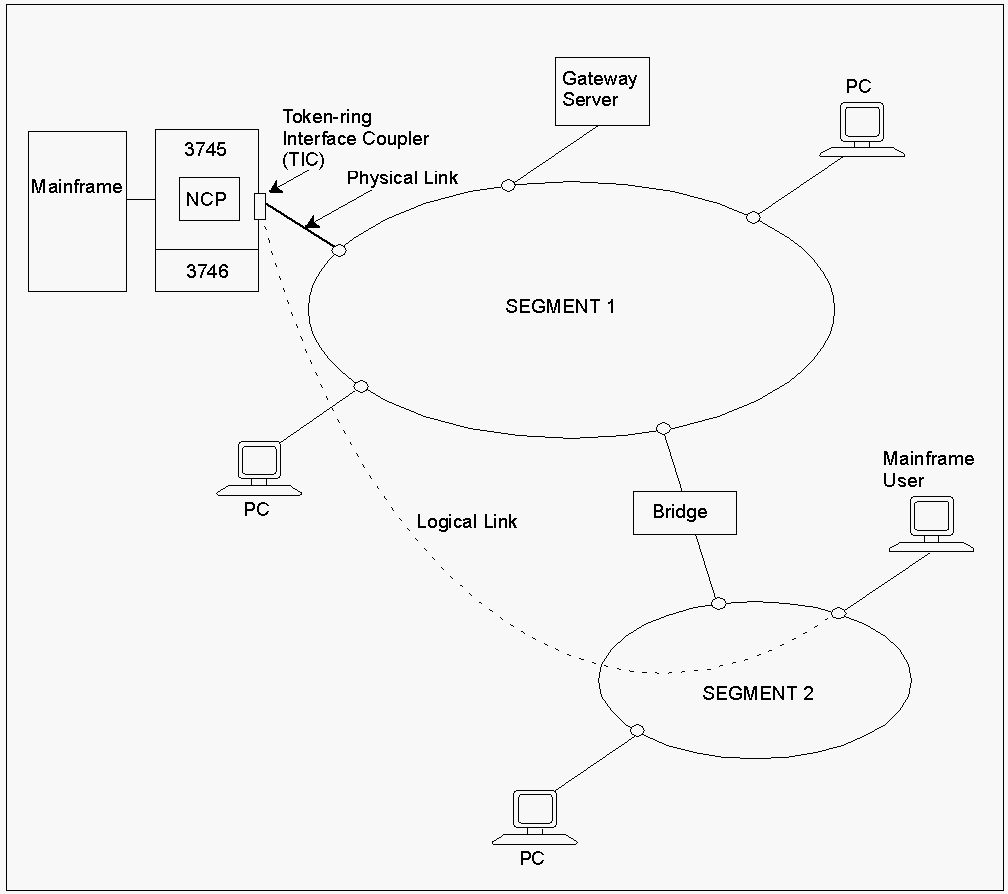
The following diagram illustrates the token-ring physical and logical links between a user and the mainframe.
If you are having problems communicating with your token-ring network, you can use the Token-ring Diagnostics menu to investigate token-ring adapters, logical links, and physical links.
 PROD--------------- NCPView : NCP001 Token-ring Diagnostics -----------ZNC021
 Select Option ===>

    LA  - List Token-ring Adapters
    BA  - Browse Token-ring Adapter Details
    LP  - List Token-ring Physical Links (TICs)
    BP  - Browse Token-ring Physical Link (TIC) Details
    LL  - List Token-ring Logical Links
    BL  - Browse Token-ring Logical Link Details
    X   - Exit

 Adapter ID ....... ________  ( Required BA Optional LA )
 Link Name ........ ________  ( Required BP BL Optional LL LP )
This menu contains the following options:
Displays all token-ring adapters on the specified NCP.
Displays details for the specified adapter.
Displays all token-ring physical links (TICs) on the specified NCP.
Displays TIC details for the specified NCP.
Displays all token-ring logical links on the specified NCP.
Displays token-ring logical link details for the specified link.
To access the token-ring diagnostics menu for an NCP
The NCPView : Token-ring Diagnostics menu appears.
You can list all the token-ring adapters on a specific NCP to find out if they are functioning.
To list token-ring adapters for an NCP
The Token-ring Adapter List for the specified NCP appears.
Note: You can enter LA at the command prompt on the NCPView : Token-Ring Diagnostics menu for that NCP.
To list the physical links associated with the token-ring adapters
The Token-rink Physical Link List appears.
To view more information about a specific adapter
The NCPView : Token-ring Adapter Details panel for that adapter appears.
Note: For information about the fields displayed on this panel, press F1 (Help).
You can list the token-ring physical links for a Token-ring Interface Coupler (TIC) on a specific NCP. This lets you monitor the status of the links to prevent or locate communication problems.
To list all token-ring physical links for an NCP
The Token-ring Physical Link (TIC) List for the specified NCP appears.
Notes:
To view more information about a specific token-ring physical link
The NCPView : Token-ring Physical Link (TIC) Details panel for that link appears.
Note: For information about the fields displayed on this panel, press F1 (Help).
You can list the token-ring logical links on a specific NCP. This lets you monitor the status of the links to prevent or locate communication problems.
To list all token-ring logical links
The Token-ring Logical Link List for the specified NCP appears.
To view more information about a specific logical link
The NCPView : Token-ring Logical Link Details panel for that link appears.
Note: For information about the fields displayed on this panel, press F1 (Help).