The Focal Point Management menu options apply to APPN network nodes and allow authorized users to manage and maintain the definitions of the backup and nesting focal points for the Problem Management category of SNA Management Services (SNAMS). Managing these definitions ensures that Problem Management information from the APPN network flows to a centralized management focal point.
For more information about SNAMS and focal point management, see the following IBM guides:
In Advanced Peer-to-Peer Networking (APPN), roles are established through the interchange of SNAMS capabilities between two nodes. One of these nodes assumes the role of a focal point, the other becomes the entry point. When this exchange has been established, the entry point is said to come under the sphere of control of the focal point.
A focal point provides centralized management for one or more entry points under its sphere of control. Each entry point can have one focal point only, but the same focal point can provide services for multiple SNAMS categories.
Both focal points and entry points are dynamic. This means that if a primary focal point becomes unavailable, a backup focal point can be requested. This also means that higher ranked focal points can replace existing focal points.
One focal point can come under the control of another focal point. This is called nesting. Nesting is typically used where each focal point is managing a different level of SNAMS.
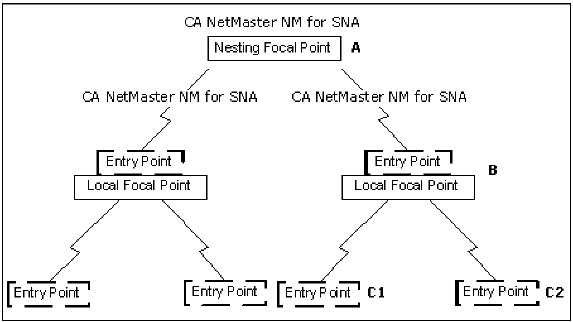
In an SNA environment, a nesting focal point, shown in the following illustration, is a focal point that has registered a local focal point as an entry point.
For example, in the previous illustration, the local focal point B sends any Problem Management information, passed to B from entry points C1 and C2, on to the nesting focal point A.
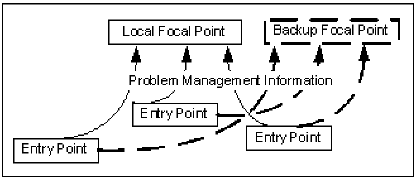
A local focal point is a focal point with entry points locally registered to it. A local focal point may become inactive after acquiring entry points. In this event, any Problem Management information from the entry points that the local focal point has acquired is sent to a backup focal point, as shown in the following illustration.
You can browse, update, and delete focal points from the SNA : Focal Point Administration menu.
To access the SNA : Focal Point Administration menu, enter /SNAFPA at the prompt.
 PROD------------------ SNA : Focal Point Administration ----------------/SNAFPA
 Select Option ===>

    BB  - Browse Backup Focal Point Definition
    BN  - Browse Nesting Focal Point Definition
    UB  - Update Backup Focal Point Definition
    UN  - Update Nesting Focal Point Definition
    DB  - Delete Backup Focal Point Definition
    DN  - Delete Nesting Focal Point Definition
    X   - Exit


  F1=Help      F2=Split     F3=Exit      F4=Return
                            F9=Swap
To browse, update, or delete a backup focal point or a nesting focal point, type the relevant letters for the option you want at the prompt.
For more information about these options, press F1 (Help).
If you choose a browse, update, or delete option for a backup focal point, the NEWS : SNAMS Backup Focal Point Definition panel appears.
If you choose a browse, update, or delete option for a nesting focal point, the NEWS : SNAMS Nesting Focal Point Definition panel appears.
The NEWS : SNAMS Backup Focal Point Definition panel displays definitions for the SNAMS backup focal point.
To define a backup focal point
The NEWS : SNAMS Backup Focal Point Definition panel appears.
Specify a name in the form Network Identifier and Network Addressable Unit (NAU) separated by a period (for example, NTWKNAME.NAUNAME).
Type a four-byte hexadecimal quoted string (in the format 'aabbccdd'X) if the string contains non-display characters.
The backup focal point is saved.
The NEWS : SNAMS Nesting Focal Point Definition panel displays the definition for the SNAMS nesting focal point.
To define a nesting focal point
The NEWS : SNAMS Nesting Focal Point Definition panel appears.
The nesting focal point is saved.