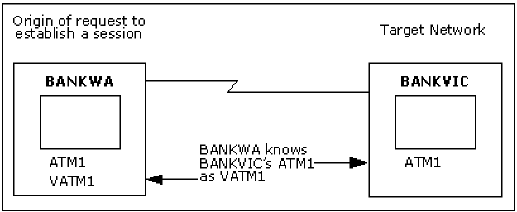
NEWS provides VTAM with alias name translation services for those levels of VTAM that request this function. Alias names are used to differentiate between same name resources in interconnected networks.
Note: Alias name translation is not necessary if there are no resource name clashes when sessions are being established between interconnected networks. A name clash occurs if a resource name in one network is also defined in the other network.
You can maintain the translation definitions by using the DEFALIAS REPALIAS, and DELALIAS commands.
You do not need to restart your region after changing or adding definitions. However, you may not be able to immediately use the new definitions for session establishment.
In the following illustration, which shows an example of alias name translation, the BANKWA network defined the alias name VATM1 to the resource ATM1 existing in the BANKVIC network because the name ATM1 was already assigned in the BANKWA network.
When multiple SNA networks are connected using a gateway function called SNA Network Interconnections (SNI), each network is known by a unique network identifier but otherwise retains its individual SNA characteristics.
During cross-network sessions in such an environment, resources that exist in a particular network may need to be known by an alias name in other networks.
Consequently, the process of establishing a cross-network session may require alias names in one network to be translated to the real resource names in another network. The Alias Name Translation Facility provides this service.
The facility can meet VTAM requests for translation from the alias name to the real name, and from real name to alias name.
Session establishment also requires the use of Class-of-Service (COS) and Logmode names. Such a name may be defined in one network but unknown in another network. However, that other network may have an equivalent definition of the name. The Alias Name Translation Facility can be used to resolve the name difference between the networks.
An LU, named X, in network A needs to connect to an application in network B. However, there is already a resource named X in network B. To establish a session, an alias name for use in network B must be provided for the resource X in network A.
A file transfer application in network A always uses logmode X, and needs to connect to an application in another network, B. If the logmode X does not exist in network B, but an equivalent logmode exists, then the Alias Name Translation Facility can be used to assign the equivalent logmode in network B.
By using the SHOW DEFALIAS command, you can display one or more alias definitions used by the Alias Name Translation Facility of NEWS. By default, you can have an authority level of 0 to display alias name definitions.
For a full explanation and examples of the SHOW DEFALIAS command and details of operands, see the online help.
The diagram in Alias Name Translation shows an example of alias name translation, where the alias name VATM1 is defined in BANKWA for the real name ATM1 existing in BANKVIC.
To display the defined alias name, enter at a command line:
SHOW DEFALIAS
All defined alias names are displayed in a list (see the following figure, which shows the SHOW DEFALIAS Results).
Command ===> show defalias
 N38304 -ALIAS--  --NET---  -RNAME--  --RNET--  -RCDRM--
 N38301  VATM1     BANKWA   ATM1     BANKVIC   -
 N38305 1 LU ENTRY DISPLAYED.
Specifies the alias name.
Specifies the name of the network in which the alias resource name is to be known, and the origin of the translation request.
Specifies the real name of the resource as it is known in the target network.
Specifies the network identifier for the target network in which the real resource name can be used.
Specifies the CDRM that owns the LU.
Note: Applies to LUs only.
By using the DEFALIAS command, you can add an alias name to NEWS for use by the Alias Name Translation Facility. By default, you must have an authority level of 4 to add an alias name.
For a full explanation and examples of the DEFALIAS command and details of operands, see the online help.
Note: The addition of definitions is normally a function of the INIT procedure processing.
The diagram in Alias Name Translation shows the alias name VATM1 defined in BANKWA for the real name ATM1 existing in BANKVIC.
To define the alias name of VATM1 as an LU in BANKWA, at a command line, enter:
DEFALIAS NAME=VATM1 NET=BANKWA
         RNAME=ATM1 RNET=BANKVIC
A message confirming the definition appears.
To see the result of the definition, at a command line, enter:
SHOW DEFALIAS NAME=VATM1
You can reduce the number of DEFALIAS commands used and simplify subsequent modifications by defining generic alias names and network names.
You can also override the generic definitions by one or more specific conditions.
For a full explanation and examples of the command and details of operands, see the online help.
You can define a generic alias name and real name pair when you want to map a range of similarly named resources (for example, MAIVF001 to MAIVF999) to some other range (for example, AMF001 to AMF999) in the target network.
By generically defining the two prefix strings only (that is, MAIVF and AMF), the Alias Name Translation Facility can carry the trailing suffix during the translation (that is, it translates MAIVF034 to AMF034).
You can generically define the networks in which an alias name is known. By using a totally generic network name (that is, a name that any network name matches), in a single DEFALIAS command, you can define an alias to exist in all networks.
When a network name is generically defined, any network name that matches the generic network name contains the alias resource name defined to that network.
By using the REPALIAS command, you can replace the real name and network defined for an existing alias name and network combination. You must have an authority level of 4 to replace an alias name.
For more information about the REPALIAS command, see the online help.
The following illustration shows the real name defined for the alias name VATM1 in BANKWA replaced with ATM2 existing in the BANKVIC network.
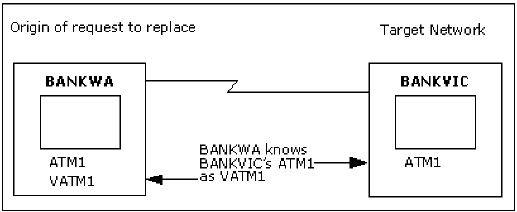
To replace the real name defined for VATM1 in BANKWA, at a command line, enter the following:
REPALIAS NAME=VATM1 NET=BANKWA
         RNAME=ATM2 RNET=BANKVIC
A message confirming the replacement appears.
To see the result of the replaced real name, enter at a command line:
SHOW DEFALIAS NAME=VATM1
The following results are displayed:
Command ===> show defalias
 N38304 -ALIAS--  --NET---  -RNAME--  --RNET--  -RCDRM--
 N38301  VATM1     BANKWA    ATM2     BANKVIC   -
 N38305 1 LU ENTRY DISPLAYED.
The definitions of the results are explained below.
Specifies the resource name and network ID that identify the real name definition being replaced.
Specifies the real name that replaces the previously defined real name.
Specifies the real network ID that replaces the previously defined real network ID.
By using the DELALIAS command you can delete the alias name defined for a real resource in a target network. By default, you must have an authority level of 4 to replace an alias name.
For more information about the DELALIAS command, see the online help.
The following illustration shows the alias name of VATM1 in BANKWA defined for ATM2 in BANKVIC.
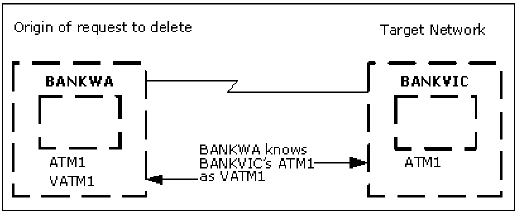
To delete the alias name VATM1, at a command line, enter the following:
DELALIAS NAME=VATM1 NET=BANKWA
A message confirming the deletion appears.
By using the XLATE command, you can test alias name translation. This command lets you see the translated name that the Alias Name Translation Facility returns to VTAM when requested to perform translation. By default, you must have an authority level of 1 to test alias name translation.
For more information about the XLATE command, see the online help.