Besides responding to resource status, you need to respond to events that are not handled by resource automation.
Normally, you use both components and you can monitor messages from multiple systems. However, if you do not want to define message profiles, you can disable the message consolidation facility and only messages from the local system can be monitored. You control the availability of the facility by using the CCONSOLIDATN parameter group.
For more information about parameter groups, see the Reference Guide.
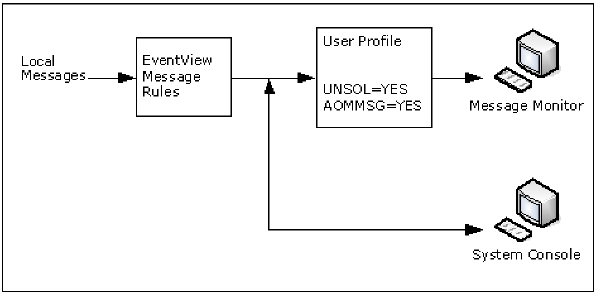
Without the console consolidation facility, you are able to monitor local messages only. Remote messages are not routed to this region, and messages from this system are not routed to remote regions.
The following illustration shows how messages arrive at the message monitor.
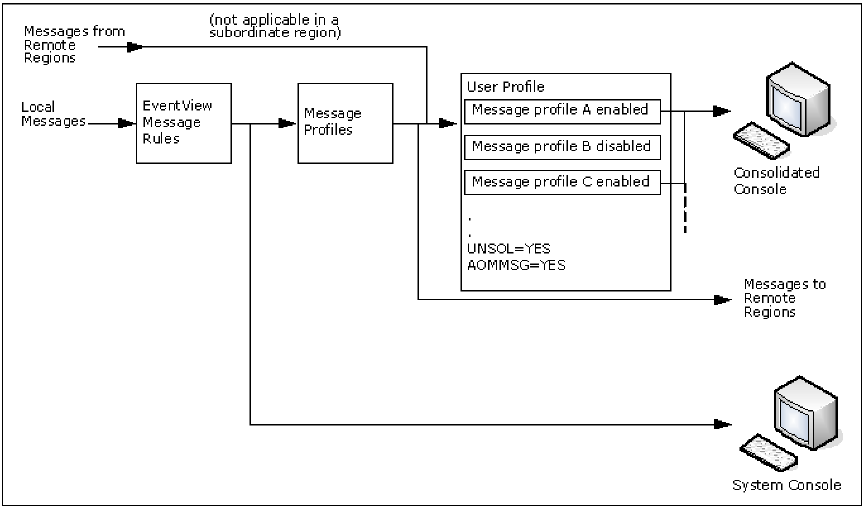
With message consolidation enabled, the message monitor becomes a consolidated console. Using the console consolidation facility, an operator is able to monitor messages from one or more systems on the consolidated console.
You use EventView message rules to preprocess the messages, for example, suppressing or highlighting the messages. You can then use message profiles to select the type of processed information to display on the consolidated console. For example, you can define a message profile that selects messages from a particular system. You can selectively enable profiles to customize the view of monitored events, for example, VTAM messages only.
The following illustration shows how messages arrive at the consolidated console.
Typical stages in implementing message profiles are as follows: