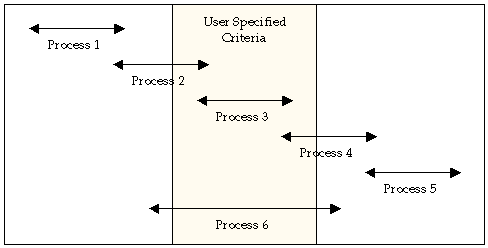
Schedule forecasting enables you to determine when to expect file transfers matching the criteria of an existing file transfer schedule. You can select any combination of systems and date/time ranges to define a criteria. Impacted schedules are listed for analysis.
The following diagram illustrates how file transfer processes are matched to a schedule.
In this example:
There are two sets of forecast:
When you schedule system maintenance, you may want to know how it affects file transfers. Forecasting lets you find out whether any file transfers are affected during that time on those systems you plan to maintain.
To forecast file transfer schedules
The Schedule Forecast Facility appears.
A list of system images appears.
You are returned to the previous panel with the specified criteria.
A list of schedules forecasted for the specified criteria appears.
Note: For more information about the list, press F1 (Help).