

|
|
|
This section provides a control file tuning example, using a two-system MIMplex. Both SYSA and SYSB are running MODE=DEMAND, CYCLE=1, INTERVAL=1. The MIMplex is using the DASDONLY communication method with the control file on a shared 3390 DASD device. The key fields from the DISPLAY SERVICE and DISPLAY IO commands are shown in the following illustration:
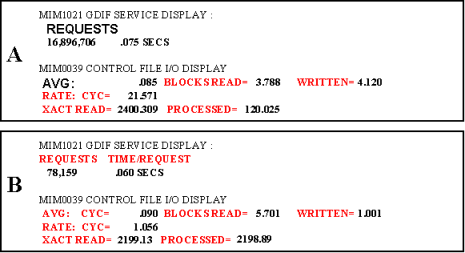
The preceding data can be analyzed as follows: SYSA appears to be a workload-intense production system, while SYSB seems to be a test system as it has very little enqueue activity. CA MIM is performing control file cycles at a rate of roughly 22 times per second on SYSA, and only one time per second on SYSB. Remember that when in DEMAND mode, control file cycles are driven primarily by 1) CA MII enqueue workload or 2) a timer expiration. Because the number of enqueue requests on SYSA is high, it is a good assumption that CA MIM control file cycles are being driven by the enqueue workload. In addition, because the number of enqueue requests on SYSB is low, it is fair to say CA MIM control file cycles are being driven only by the timer expiration.
This MIMplex appears to be poorly tuned because of the following facts:
In short, the disproportionate control file cycle rates by the CA MIM address spaces are degrading the CA MII enqueue service times.
This analysis shows that CA MIM on SYSB needs to be performing control file cycles more often, to keep pace with the SYSA control file cycle rate. The correct approach is to issue SETOPTION INTERVAL=.1 on SYSB as this forces CA MIM on SYSB to perform control file cycles at a rate of 10 times per second, instead of 1 time per second. Then issue DISPLAY IO=RESET and DISPLAY SERVICE=RESET on both SYSA and SYSB. After 24 hours, issue DISPLAY IO and DISPLAY SERVICE commands again on both systems and analyze the data.
You see that the average control file cycle times have gone down, that blocks read and written have gone down, that the transaction read to transaction processed ratio has improved, and that the enqueue time per request have improved. If further adjustments are warranted, then you might further reduce the INTERVAL on SYSB to .08 (13 accesses per second), reset the DISPLAY commands, and analyze the statistics again after 24 hours.
Once you have found the desired setting, make a permanent update to the MIMCMNDS member of parmlib so that CA MIM on SYSB will have those values in effect at startup. You can add the following statements to the MIMCMNDS member:
IFSYS SYSB
   SETOPTION INTERVAL=.08
ENDIF
In summary, the control file analysis phase is to be performed on all systems in the MIMplex. Based on this analysis, you typically alter the control fine cycle rates on only a small subset of the systems in the MIMplex. Once you have dynamically altered the control file cycle characteristics on a few systems, and are satisfied with the results, you need to update the CA MIM parmlib to have those values in effect at CA MIM start up.
| Copyright © 2011 CA. All rights reserved. | Tell Technical Publications how we can improve this information |