

|
|
|
You can create, edit, or delete a Load Balance Group in the Load Balance Group Editor. To access the Load Balance Group Editor, select Load Balance Groups Editor… from the Linear Display or Graphical Display Edit menu. The Load Balance Group Editor appears.
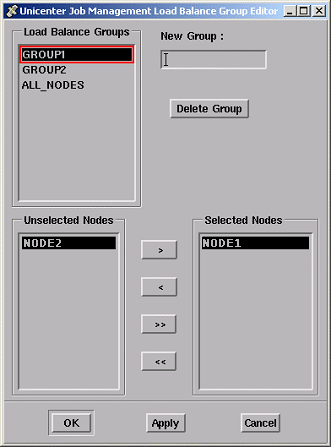
From the editor, you can select the nodes from your local cluster that you want to include as members of the Load Balance group. The dialog box includes a list of Load Balance Groups. For the currently selected Load Balance group, the editor displays a list of Unselected Nodes and a list of Selected Nodes. With the editor, you can also delete a group and specify a new group name.
| Copyright © 2012 CA. All rights reserved. | Tell Technical Publications how we can improve this information |