

|
|
|
When compliance or pattern checks are performed, CA Identity Manager displays violation messages above the current task in the User Console, as shown in the following example.
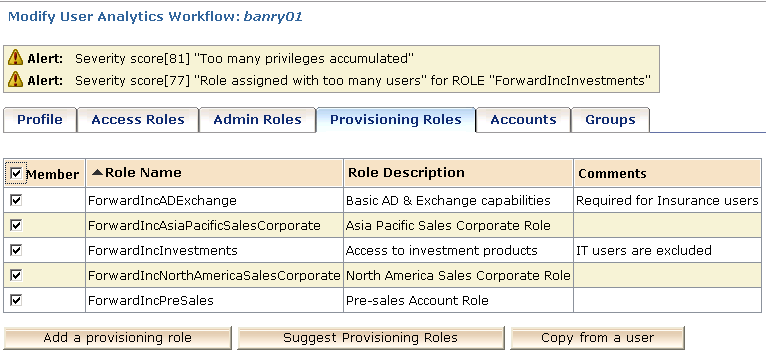
The violations include the following information:
Indicates one of the following categories:
Indicates a severe compliance or pattern violation. Administrators cannot submit a task until the error is resolved.
Indicates a significant compliance or pattern violation. Administrators can submit a task with one or more warnings, however, they are prompted to confirm that they are overriding the warnings. This override becomes part of the permanent record of the task. Administrators can provide an optional justification, which is also recorded with the task history.
Indicates all other levels of compliance or pattern violations. May also indicate a violation that may cause a pattern violation for other users, who are not involved in the current transaction.
Administrators can override alerts. No confirmation or justification is required.
Note: You configure the criteria for each category when you configure tasks that display compliance and pattern warnings.
The type can be Compliance or Pattern.
Indicates the severity of the violation as a number from 1 through 100, with 100 indicating the most severe violation.
States the business policy or type of pattern that the proposed change violates.
Note: For compliance violations, the text in the violation details and the severity score are configured when the Business Policy Rule is created in CA RCM.
| Copyright © 2010 CA. All rights reserved. | Email CA Technologies about this topic |