Administration Guide › CA Role & Compliance Manager Integration › How to Configure Integration with CA RCM
How to Configure Integration with CA RCM
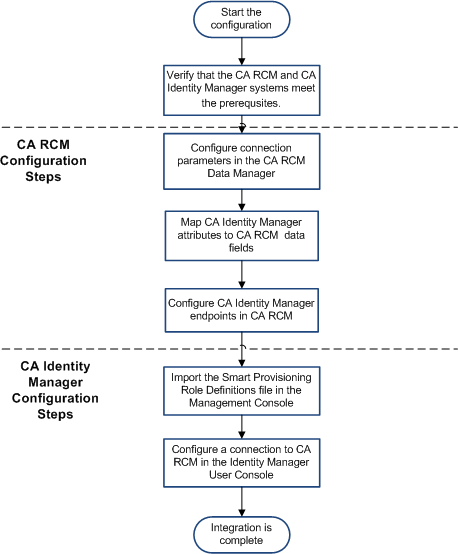
The following high-level steps are required when you configure integration with CA RCM.
- Verify that the system that hosts CA RCM and CA Identity Manager meet the configuration requirements.
- In CA RCM, complete the following steps:
- Configure connection parameters in the CA RCM Data Manager.
- Map CA Identity Manager attributes to CA RCM data fields in the defaultMapping.xml file that is installed with the CA RCM client tools.
- Define the Identity Manager endpoints that are imported into CA RCM, and how resources in those endpoints should be handled.
- In CA Identity Manager, complete the following steps:
- Add support for the CA RCM integration to the Identity Manager environment by importing the Smart Provisioning role definitions in the Management Console.
Note: The Smart Provisioning role definitions include the task that you use to configure the connection to CA RCM in the User Console. Import these Role Definitions even if you do not plan to use the Smart Provisioning functionality.
- Configure a connection to CA RCM and map CA Identity Manager attributes to CA RCM attributes in the Identity Manager User Console.
- (Optional) Configure Smart Provisioning functionality, including suggested provisioning roles and compliance and pattern messages.
After you configure the integration between CA Identity Manager and CA RCM, you can import Identity Manager data into CA RCM to create a role model. Role engineers modify the model to reflect the desired role structure and then export the model to CA Identity Manager. When the model is applied, CA Identity Manager changes role definitions and membership, as needed.
The following flowchart illustrates the steps required to configure integration between CA Identity Manager and CA RCM.
More Information:
How to Configure a Connection in CA RCM
How to Configure a Connection in CA Identity Manager
Configure Defaults for Suggest Provisioning Roles
How to Configure Compliance and Pattern Violation Support

