

|
|
|
You can use GINA configuration tool to edit default GINA values and export them to a registry (.reg) file for repackaging. The settings can also be applied to the current system.
To configure GINA
C:\Program Files\CA\Identity Manager\Provisioning GINA
ginaconfig.exe
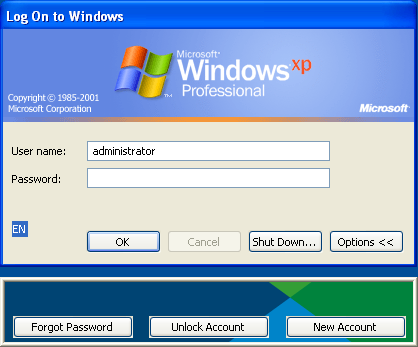
The complete command line to execute when a user clicks the Forgot Password link. This link should load a URL to a web interface for password resetting. For example, the command could be:
http://eastern.local:8080/idm/pub/ca/index.jsp?task.tag=ForgottenPassword
For this URL, self enrollment must be working on the environment. Also, check to make sure the Self Service a URL for the Identity Manager environment works from the system where you are installing the GINA.
The complete command line to execute when a user clicks on the Unlock Account link. This link should load a URL to a web interface allowing a user to unlock an account.
The complete command line to execute when a user clicks on the New Account link. This link should load a URL to a web interface allowing a user to create a new account.
An alternative to the Link commands, providing the same features and appearing during Window logon. This dialog can also render a BMP, WMF, or ICO image in the background. An example of a floating dialog follows:
The Provisioning domain name.
Enables the Return function in a menu. If unchecked, the Return dialog is used.
The default page to navigate to when no command line is given for the link1_cmd or link2_cmd.
A regular expression pattern matching URLs to which access should always be allowed.
A regular expression pattern matching URLs to which access should always be denied.
| Copyright © 2010 CA. All rights reserved. | Email CA Technologies about this topic |