

|
|
|
Once you have created the WebSphere cluster, you can install CA Identity Manager on it.
Note: Installer fields that require a hostname and port number should not use localhost.
To install CA Identity Manager on the Deployment Manager server
ca-im-r12.5sp3-win32.exe
ca-im-r12.5sp3-sol.bin
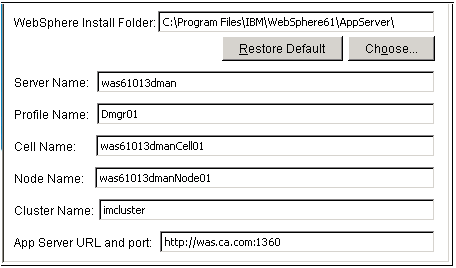
The folder or directory where WebSphere is installed. You find this location in the Windows or UNIX file system.
The first cluster member in the WebSphere cluster. You find this name in the WebSphere console.
The deployment manager profile. You find this name in the Windows or UNIX file system at the path:
was_home/profiles/Deployment_Manager_Profile/config/cells/
The deployment manager's cell which can be found in the WebSphere console.
A node that contains the Server Name you supplied on this screen. You find this name in the WebSphere console.
The name of the cluster. You find this name in the WebSphere console.
The URL and port number of the Web Server used for load balancing.
If any issues occur during installation, check the installation logs.
Important! Do not start the cluster yet. It will not function at this point. Complete the remaining procedures, which conclude with the steps to start the cluster.
| Copyright © 2010 CA. All rights reserved. | Email CA about this topic |