Installation Guides › WebSphere Version › Installation on a WebSphere Cluster › WebSphere Cluster Setup
WebSphere Cluster Setup
When you install software for a WebSphere cluster, you set up the following:
- One WebSphere Deployment Manager—Manages the other federated profiles in the cell through node agents.
- One or more nodes—Each node contains one or more cluster members (also called servers), which run the Identity Manager Server.
- Node agent—A process that manages communication between the Deployment Manager and the federated profile.
- Service Integration Bus—Groups resources in WebSphere to simplify administration. The WebSphere cluster is added as a member of the bus.
- Messaging Engine—Provides messaging functionality for members of the service integration bus. Each cluster member has a messaging engine.
- Message Store—Stores messages and transaction status for a messaging engine. Each message engine requires a message store.
- A Web Server—Distributes the load to the appropriate server and, if SiteMinder is installed, protects access to the cluster members.
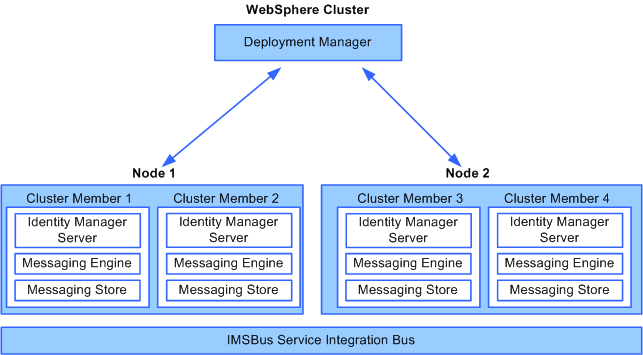
The following figure shows the relationship between the Deployment Manager, nodes, and cluster members. The Identity Manager Server is installed from the Deployment Manager system to each cluster member, each of which has a messaging engine and a message store.
Note: For more information about these components, see the WebSphere documentation.