

|
|
|
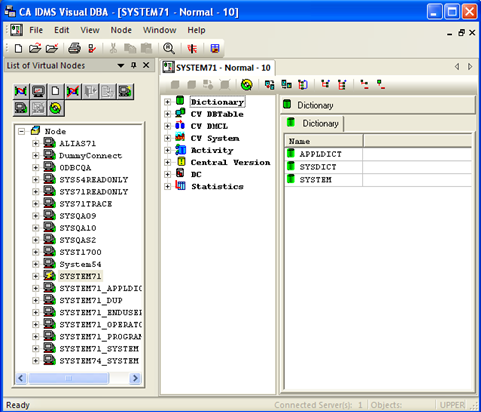
CA IDMS Visual DBA displays in its own application window. This main window is referred to as the workspace environment and is the primary work area for your tasks. Initially, it has two subwindows:
Note: If instead of the Dom tree in the DOM window a dialog box appears with the message "Failed to create empty document", the IDMS CV has Enhanced Object Security enabled and the user connected to the CA IDMS system has not been assigned a profile or the profile does not contain any valid root nodes. Review and correct the configuration of the mainframe component of CA IDMS Visual DBA.
The Workspace Environment window includes a menu bar and several toolbars. These are documented in detail in online help. The Workspace toolbar and the Nodes window toolbar are described in the following brief:
| Copyright © 2011 CA. All rights reserved. | Tell Technical Publications how we can improve this information |