

|
|
|
The Enhanced Client or Proxy Profile (ECP) is an application of the SAML 2.0 single sign-on profile. An enhanced client may be a browser or some other user agent that supports the ECP functionality. An enhanced proxy is an HTTP proxy, such as a Wireless Access Protocol proxy for a wireless device.
An enhanced client or proxy is a system entity that knows how to contact an Identity Provider and supports the Reverse SOAP binding, PAOS, for the purpose of providing single sign-on for a user. The ECP acts as the intermediary between the Service Provider and the Identity Provider.
The ECP profile allows the Service Provider to make an authentication request without knowing the Identity Provider, and PAOS lets the relying party obtain the assertion through the ECP, which is always directly accessible, unlike the Identity Provider.
You might want to enable the ECP profile with single sign-on in the following situations:
The flow of the ECP profile is shown in the following figure:
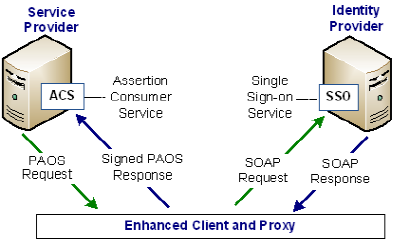
To enable the ECP profile
https://host:port/affwebservices/public/saml2authnrequest
Accept: text/html; application/vnd.paos+xml
PAOS: ver='urn:liberty:paos:2003-08' ;
'urn:oasis:names:tc:SAML:2.0:profiles:SSO:ecp'
| Copyright © 2010 CA. All rights reserved. | Email CA about this topic |