

|
|
|
You can click Get Updates next to the local and remote entity fields to update information about the entity. When you select Get Updates, Federation Manager asks if you want to pull in the latest information from the entity.
After confirmation, the partnership you are editing is refreshed with the latest entity information. Changes are saved when you complete the Partnership wizard. If you do not confirm the update, no change is made to the partnership.
The Entity Name identifies an entity object for in the Federation Manager database. The Entity Name must be the unique identifier because this value is what Federation Manager uses internally to distinguish an entity. This value is not used externally and the remote partner is not aware of this value.
If the Entity ID represents a remote partner, the value must be unique. If the Entity ID represents a local partner, it can be reused on the same system.
Note: The Entity Name can be the same value as the Entity ID, but the value must then not be shared with any other entity at the site.
An entity is a key component of a federation partnership. Changing an entity alters the partnership significantly; therefore, the Federation Manager UI does not let you replace an entity after it is in a partnership. To replace an entity, you have to create a new partnership.
To provide some flexibility within partnership configuration, you can change an entity ID because it does not identify the entity uniquely. However, changing the entity ID at the partnership level does not link the partnership to another entity nor does it update the original entity in the partnership. Modifications to an entity are a one-way propagation from the entity to the partnership. A change to the entity ID at the partnership does not get propagated back to the original entity.
Regard entity configurations as templates. Partnerships are created based on the entity templates so changing the partnership does not change the original entity template.
Example:
The following figure shows an entity configuration with an Entity ID of LocalIdP1.

The following figure shows a partnership that uses entity LocalIdP1.
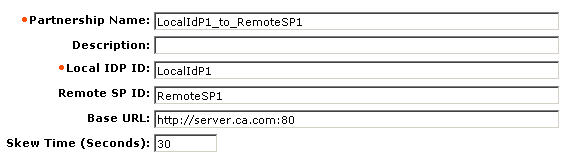
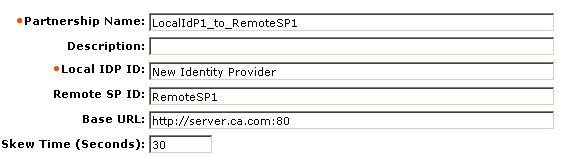
You change the Local IDP ID value to New Identity Provider in the partnership, as shown in the following figure. However, the value in the Entity ID field for the entity configuration remains LocalIdP1, as in the previous figure.
| Copyright © 2010 CA. All rights reserved. | Email CA about this topic |