

|
|
|
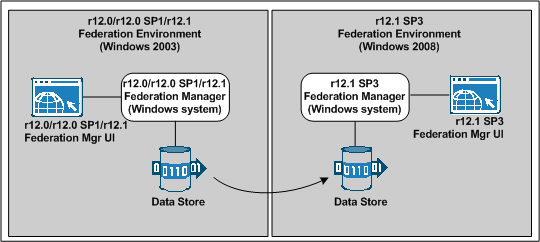
Migrating to Federation Manager r12.1 SP3 on Windows 2008 requires that you set up a new r12.1 SP3 system. After installing a new system, migrate data from the existing Windows 2003 environment.
We recommend you perform the migration in a test environment not in a production environment.
The following figure illustrates the migration path.
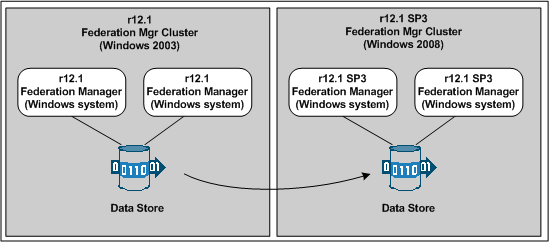
You can set up a Federation Manager cluster to support failover. You can migrate from an existing r12.1 cluster to a new cluster, using a procedure similar to a non-cluster migration. To migrate a cluster, you set up a new r12.1 SP3 system for each system in your existing cluster. However, because systems in a cluster share one database, you only migrate the federation data once. You still have to migrate keys and certificate files for each system in the cluster.
How to Migrate a Configuration from One System to Another describes the procedure in detail.
| Copyright © 2011 CA. All rights reserved. | Email CA Technologies about this topic |