Working with subject areas is especially useful when designing and maintaining a large or complex data model. By dividing a subject area into several smaller subject areas, you can allow different groups within an organization to concentrate on the processes and tasks pertinent to their own business area.
Subject area functionality was changed significantly for r8. Unlike in previous releases, a model is now not required to contain any subject areas and is completely optional. In previous releases when you created a new model, the default subject area, called Main Subject Area, was always created. For r8, Main Subject Area was removed. Subject areas are not created by default.
You can create and delete subject areas without restriction. An option is provided that lets any subject area automatically synchronize its membership with the model, similar to how Main Subject Area is implemented in r7.x.
Both the Model and Subject Areas may own diagrams although the presence of diagrams is completely optional.
Note: For more information about the replacement of stored display by diagram, see Diagrams Replace Stored Displays.
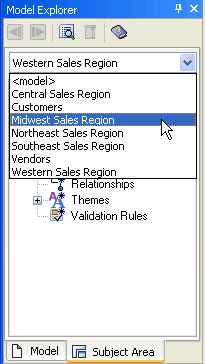
In the Subject Area tab in the Model Explorer, a drop-down exists so you can select an available subject area as the current subject area.
| Copyright © 2011 CA. All rights reserved. | Email CA Technologies about this topic |