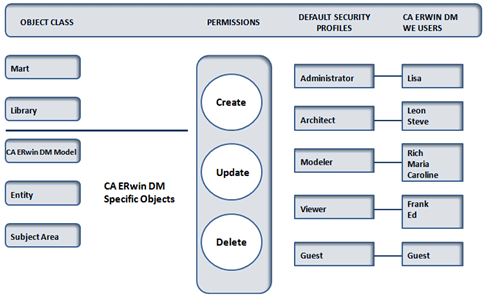
A comprehensive security system prevents unauthorized users from adding, modifying, or deleting objects in the mart. To ensure security, all objects are divided in hierarchical security classes and all users are assigned to a security profile. A security profile is a set of permissions that control the actions a user can perform on a specific group of objects, called a permission object class, in the mart. During installation, five hierarchical security profiles are automatically created. These predefined security profiles are as follows:
Security profiles determine who can change the data contained in the mart. By understanding the activities that each member of a workgroup performs, you can assign the necessary privileges and customize permissions to meet the exact needs of the workgroup.
When you attempt to create, modify, or delete an object, your security profile determines if the operation is permitted in the mart. Object classes are used to divide objects in hierarchical groups. You can perform an action on an object or be restricted from performing an action on an object based on the security profile. Each profile grants permissions at the object class levels: mart, library, model, entity, and subject area.
Note: Security profiles do not affect the actions you can perform in CA ERwin Data Modeler. You can create, update, or delete all models locally and you can save your changes to an .erwin file. However, when you save an updated model back to the mart, you are prohibited from performing any action for which you do not have permission.
| Copyright © 2011 CA. All rights reserved. | Email CA Technologies about this topic |