

|
|
|
The performance of CA ERwin Data Modeler Workgroup Edition depends on many factors. This appendix outlines some steps you can take to improve your performance. The five main components where a slow down can occur are the database, the server, the network, the client PC, and the CA ERwin Data Modeler Workgroup Edition software.
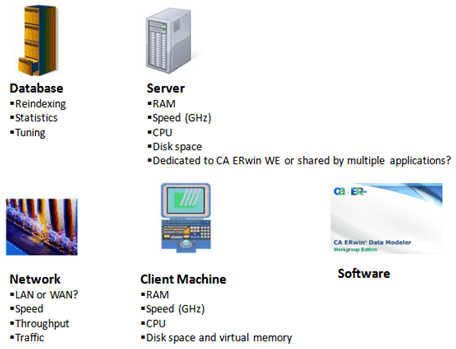
You should regularly reindex the database and run the database statistics. Sometimes running the database statistics alone does not affect the performance, however it is good practice to run the database statistics on a regular basis to ensure the maximum performance of your database.
In past releases, multiple versions of the same model in the mart can slow down overall performance. You can remove versions by selectively purging them using the Version Manager. CA ERwin Data Modeler Workgroup Edition r7.2 or later lets you to disable the versioning so it does not create a new version with every save of a model to the mart.
If you have many domains in a model, they consume a lot of memory and file space. Having too many domains can slow down CA ERwin Data Modeler Workgroup Edition. If you need to use many domains, we suggest you create a template model to house them, and then import the specific domains that you need, to each of your individual models. If you are using the domains to enforce unique attribute or column naming standards, you can alternatively use the ERwin Glossary (*.nsm) for that purpose.
Check the CA ERwin Data Modeler Workgroup Edition Release Notes for the latest system requirements. Greater CPU speed, and more RAM and disk space result in better performance.
Over a period of time, database indexes become fragmented. A large number of inserts and deletes can lead to significant performance degradation. The scripts provided in this appendix rebuild the indexes and fix them. In some cases, it can make a significant difference in the mart performance.
We recommend that you reindex your mart database nightly or during off-peak hours. As the index is recreated, the process can temporarily degrade the performance of your database. You can create an automated batch job to do the reindex. You should also reindex the database after a large model merge, a save to the mart, and right after a conversion of the mart when upgrading to a later version of the software.
| Copyright © 2011 CA. All rights reserved. | Tell Technical Publications how we can improve this information |