

|
|
|
To enable the traversal of a particular relational database, it is necessary to have a command which moves data from one place to another. Within CA-DATACOM/DB this typically means retrieving a record from a table and placing its contents in an input buffer, then using data in a field of that record to act as the key value for retrieval from another table. In this fashion, rows of data, in different tables which are related to each other, can be unloaded/reloaded to set up a testing environment.
In CA-Datamacs/II the movement of data will be done by a MOVE command. This new function logic MOVE command should not be confused with the limited MOVE command of the field generators. Only the function logic MOVE command can be used to set up key values for database retrieval functions. The reason for this is that CA-DATACOM/DB allows for a situation where the key to be used for retrieval does not have to be present in the elements composing the record to be retrieved. The LOCATE command, which requires keys, cannot be used for this purpose because it does not retrieve data at all and, when using concatenated key fields, only a partial key may be used, but the entire key will be returned. The function logic MOVE command allows access to the entire key value as defined by a key occurrence in Datadictionary.
To successfully use the function logic MOVE command, it will be necessary to understand where CA-Datamacs/II puts the data it is accessing.
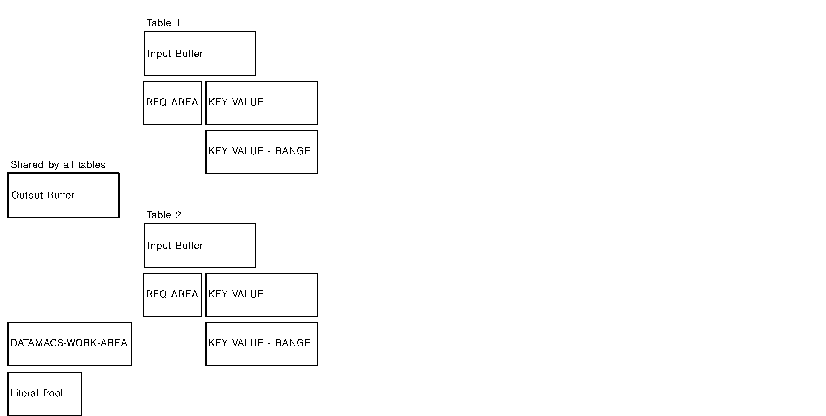
There are 3 primary areas where data can reside within CA-Datamacs/II:
Whenever an ADDIT or UPDATE command is issued the work area points to the contents of the output buffer.
For a retrieval or DELETE command, the work area is the input buffer.
There is a literal pool and a DATAMACS-WORK-AREA for temporarily storing key values during a complex access technique of a single table or multiple tables.
A schematic of these CA-Datamacs/II internal buffer areas follows. Assume we have two tables in this database and a COPY TABLE statement has been coded for each one.
| Copyright © 2009 CA. All rights reserved. | Tell Technical Publications how we can improve this information |