|
|
|
You can copy and paste delimited lists from any text editor or text file. CA DLP recognizes commas, tabs, semi-colons, and line breaks as following separators between items:
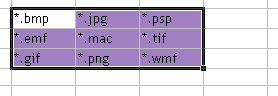
You can also copy items from a table or spreadsheet. Copy the items you want to the Clipboard then paste them directly into the target policy list. Below are some examples that can be pasted directly into a list setting:
|
Formats |
Example |
|
Comma* |
*.bmp,*.gif,*.jpg,*.png *.bmp, *.gif, *.jpg, *png |
|
Semi-colon* |
*.bmp;*.gif;*.jpg;*png *.bmp; *.gif; *.jpg; *png |
|
Tab |
*.bmp *.gif *.jpg *.png |
|
New line |
*.bmp *.gif *.jpg *.png |
|
Spreadsheet or word processor table |
|
| Copyright © 2011 CA. All rights reserved. | Email CA Technologies about this topic |