Previous Topic: Bivio 2000 Output to Disk: Passive Mode Only

Next Topic: Bivio 2000 Output to Socket Connection: Active and Passive Modes

Bivio 7000 Output to Disk: Passive Mode Only

The diagram below summarizes the NBA deployment architecture for Bivio 7000 appliances when data is output to the local hard disk.

For this output option, the NBA can only run in passive mode. In this example, data packets destined for the Internet pass through switch 1. From here, copies of these packets are replicated to the NBA, reassembled into files and e‑mails, and stored in the NBA FTP folder. They can then be imported onto the CMS, either directly or as part of an Import Policy job.
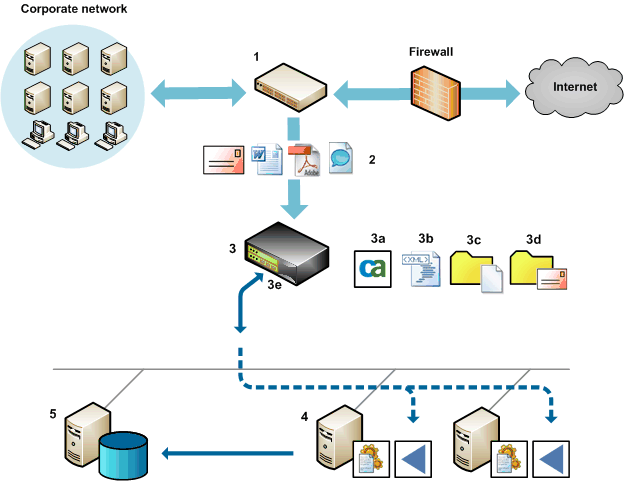
Bivio 7000 architecture, output to disk

Example architecture for Bivio 7000 appliance: Output to disk, Passive mode

  1. Switch: Data packets passing through the switch from your corporate network to the Internet are replicated to a Data Inspection port on the NBA.
  2. Network traffic: Replicated data packets containing captured emails, Webmails, files and IM conversations are passed to a receiving data port (s0.e0, s0.e2, s0.e4 or s0.e6) on the back of the appliance.
  3. NBA: This hosts the Web console (3a) as well as the nbapolicy.xml policy file and nbaconfig.xml configuration file (3b).

    The NBA reassembles the incoming data packets into e‑mails and files and stores them in \files and \mails subfolders (3c and 3d) of the NBA FTP folder.

    You connect to the NBA via the management port (3e) on the front of the box to manage NBA operations and subsequently when importing captured data.

  4. Import Policy: We recommend you run two Import Policy operations to separately import and apply policy to files and emails (imported from 3c and 3d respectively). In this example, both Import Policy servers are running in direct mode using local policy engines.
  5. CMS: The resulting events are replicated up to the CMS and stored for subsequent retrieval and reviewing.

More information:

Passive Mode