Universal Adapter Configuration Guide › What Is the Universal Adapter? › Universal Adapter Architecture
Universal Adapter Architecture
The diagram below shows how the Universal Adapter: imports emails from journal mailboxes; processes them; optionally integrates with policy engines to apply policy and assign smart tags; outputs the imported e‑mails to various locations and then archives them.
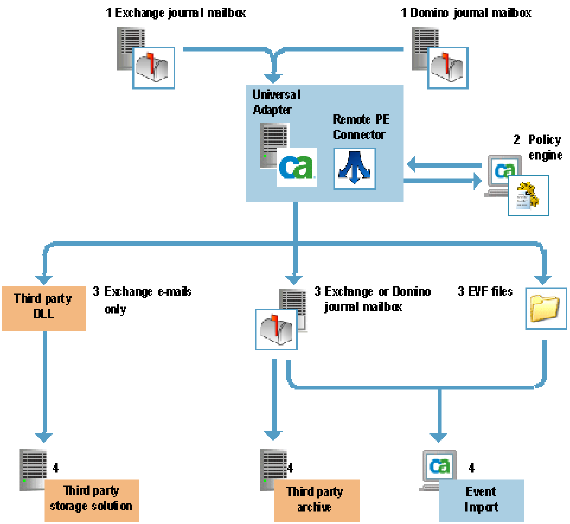
The Universal Adapter Architecture illustration is described as follows:
- Journal Mailboxes. The Universal Adapter can import emails from multiple Exchange and Domino journal mailboxes.
- Policy engine. You can optionally connect the Universal Adapter to a policy engine (via a hub) to apply policy to emails and populate them with smart tags.
- Outputs. The Universal Adapter then outputs the processed emails to: an Exchange or Domino mailbox; EVF files; Event Import; or (for Exchange emails only) a third party DLL.
- Archives. Finally, the emails are passed to an archive or storage solution, or alternatively to Event Import for importing into CA DLP.

