

|
|
|
The example below is based on the examples in Account Import wizard, steps 4 and 5. It assumes that the Create New Users option is selected when you run the Account Import wizard.

Example LDAP directory structure
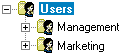
CA DLP user hierarchy: Before importing
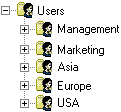
CA DLP user hierarchy: After importing
The original LDAP directory structure is preserved in the CA DLP user hierarchy.
| Copyright © 2011 CA. All rights reserved. | Email CA Technologies about this topic |