

|
|
|
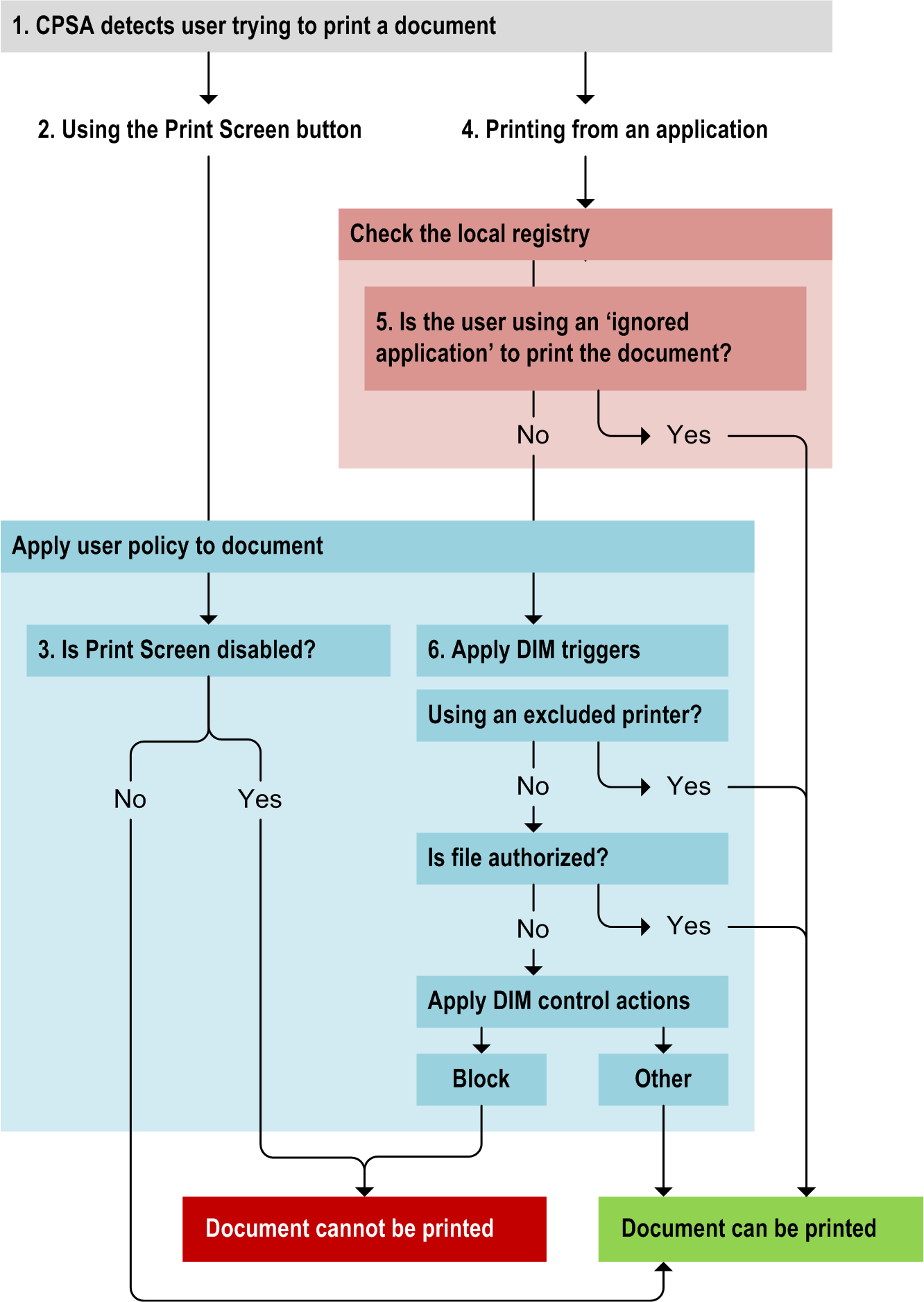
In the diagram below, a user tries to print a file (1). First, the CPSA checks whether the user is printing from an application or is using the Print Screen button.
If the user is simply using the Print Screen button to send the screen contents to a printer (2), the CPSA applies user policy to the print request to determine whether or not the Print Screen button is disabled (2).
If printing from an application (4), the CPSA checks the registry to see whether the application is exempt from policy control (5). If so, the CFSA allows the file to be printed. If not, it applies Data In Motion policy triggers (6).
These triggers first check if an authorized printer is being used. If so, the CFSA allows the file to be printed. If not, the file’s properties and text content are analyzed. If the file is not authorized, a control action determines whether to allow the print operation. If the file is authorized, the print operation is allowed.
| Copyright © 2011 CA. All rights reserved. | Email CA Technologies about this topic |