

|
|
|
We do not recommend cold backups. However, if you intend to run cold backups of your Oracle database, you must suspend the CMS before starting the database backup and restart it when the backup is complete. This prevents error messages being written to the CA DLP Activity log (viewable in the Administration console).
To suspend or resume the CMS
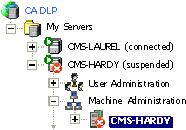
In this example, CMS-HARDY is suspended. The CMS icons (CMS-HARDY) change to reflect the change of status.
| Copyright © 2011 CA. All rights reserved. | Email CA Technologies about this topic |