Deployment Guide › Technical Information › CA DLP Installations on 64-bit Machines › Exchange 2007 and 2010 Server Agent and Policy Engine Hub › 64-bit Machines Performance Counters
64-bit Machines Performance Counters
On a 64-bit machine, there are two instances of the Performance applet (perfmon.exe). Find these in:
- C:\Windows\System32: This is the main System folder for the 64-bit operating system. The Performance applet in this folder can only display CA DLP performance counters for the Exchange 2007 and 2010 server agents. (The folder name, an apparent misnomer, is a legacy of the folder naming scheme in earlier Windows operating systems.)
- C:\Windows\SysWOW64: The Performance applet in this folder can display CA DLP performance counters for both the Exchange 2007 and 2010 server agents and the hub For simplicity, we recommend that you use this instance of the Performance applet.
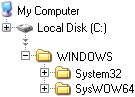
Performance utility, 64-bit machines
1 Only performance counters for the Exchange 2007 and 2010 server agents are available using the Performance applet in this folder.
2 Performance counters for the Exchange 2007 and 2010server agents and PE hub are available using the Performance applet in this folder.

