

|
|
|
New client machines automatically inherit the common client policy, while new gateway servers automatically inherit the common gateway policy. Configure these policies to suit your requirements.
Purging strategy was discussed in task 4 Configure event purging, but you will probably want to amend other policy areas. For example, settings in the Infrastructure, Security folder let you configure an encryption strategy for data sent across the network to the CMS from gateways and client machines. Likewise, the Replication settings determine how often CA DLP machines send notification of newly captured data or local infrastructure changes. These notification messages act as triggers for data replication.
To edit the common client or common gateway policies
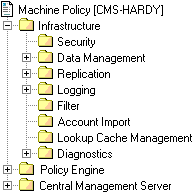
Machine policy folders; Note the Security and replication folders
| Copyright © 2011 CA. All rights reserved. | Email CA Technologies about this topic |