

|
|
|
The email address table in the CMS database supports all email address formats, for example:
SMTP: spencerrimmel@unipraxis.com
EX: /o=unipraxis/ou=uk/cn=spencer/cn=rimmel
Domino: cn=spencer rimmel/o=unipraxis
You typically use Account Import to synchronize your CA DLP user hierarchy with your organization’s primary user hierarchy (for example, Active Directory), importing email addresses via LDAP or a file into the CMS database and mapping them automatically to CA DLP users.
You can also manually add or edit email addresses in the User Properties dialog in the Administration console—see the previous FAQ for details.
To view all addresses and aliases associated with an individual CA DLP user, right-click that user in the Administration console and choose Properties, then go to the Addresses tab in the resulting dialog:
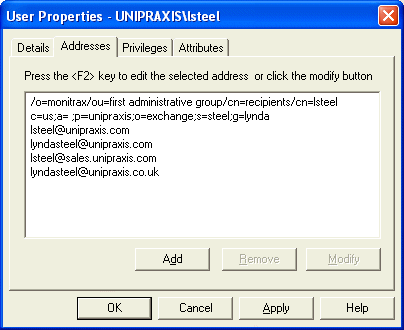
User Properties dialog, Addresses tab
| Copyright © 2011 CA. All rights reserved. | Email CA Technologies about this topic |