

|
|
|
Occasionally, you may encounter some problems with the discovery of Agents on a z/OS LPAR. The following tips may help you diagnose and resolve these problems.
The first-level discovery process uses your TCP/IP stack’s SNMP process to classify your mainframe node. This is not the Agent Technology SNMP service, but rather, this is the SNMP service that comes with the IBM (or third-party) TCP/IP stack. This service must be running at the time the mainframe node is discovered for the node to be properly classified as an IBM3090. IBM’s SNMP service (OSNMP) is usually started via an AUTOLOG command in the TCP/IP started task’s PROFILE data set.
If the node is not properly classified, it can be reclassified manually from the NSM machine (using the reclass command).
See Configuring the aws_sadmin Service subsection in the Installation Considerations section earlier in this chapter for more information.
Run onetstat under OMVS to ensure the SNMP listener port (6665 by default) is in the proper state. Check to make sure there are no firewalls preventing UDP traffic from entering your mainframe network.
The second-level discovery process uses the awsAdmin MIB to discover agents running on z/OS.
To list active agents using mibbrowse
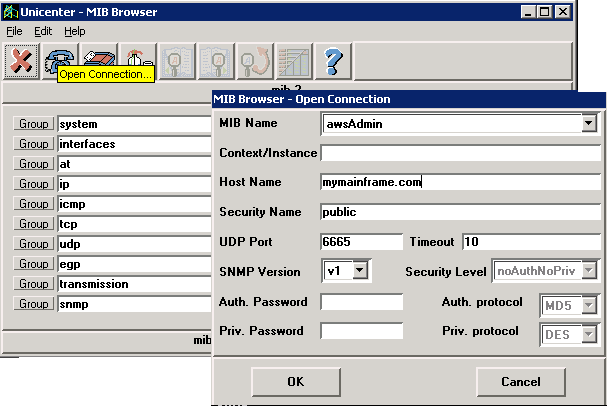
awsAdminAgentGroup->awsAdminAgentTable
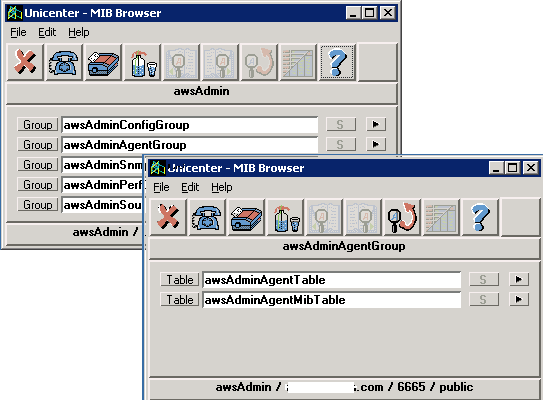
Drill down to an agent group: (All active agents in this group should be listed.)
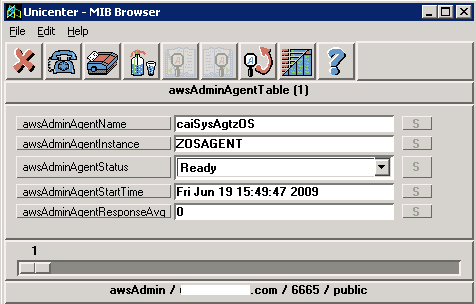
Drill down to an agent table:
| Copyright © 2011 CA. All rights reserved. | Tell Technical Publications how we can improve this information |