

|
|
|
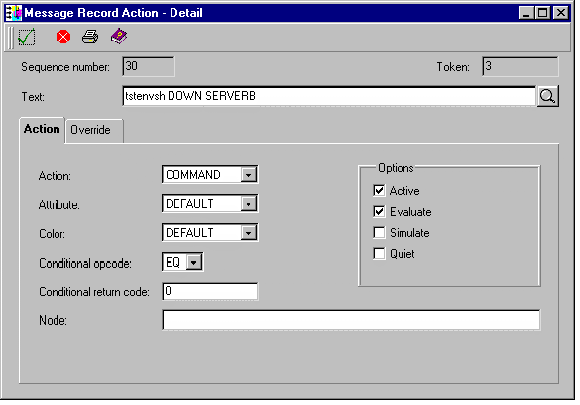
The Message Action Detail action of COMMAND can be used to run a program or shell script. To perform this type of processing, you can execute the script tstenvsh as follows using the action COMMAND to test the contents of a previously set variable.
#
# Args: 1 - The value to be tested for
# 2 - The variable to test
#
# Results: Equal - return 0.
# False - return 1.
#
#
var='$'`echo $2`
# Test if the variable has been defined first
if [ ! `eval echo $var` ]; then exit 1
fi
# It has been defined, test the value
if [ "$1" = `eval echo $var` ]; then
   exit 0
fi
# Not EQUAL exit false
exit 1
Following is an example of the Message Record Action-Detail screen defined to test if a variable SERVERB has the value of DOWN.
| Copyright © 2012 CA. All rights reserved. | Tell Technical Publications how we can improve this information |