

|
|
|
For either the Web Services Connection method or the Query as a Web Service connection method, create a connection definition in Xcelsius using the Data Manager.
The approach to connecting real-time data from CA Clarity PPM to an Xcelsius visualization can vary depending on the following:
To allow real-time CA Clarity PPM data transfers, you must bind elements to cells in the embedded Excel spreadsheet of a visualization. The series of steps enable the components of the visualization to retrieve data from the cells to which they are bound. The external data connection, either the Web Service connection or Query as a Web Service, must be configured to insert data into the embedded spreadsheet. Components that use the data from the external source are then bound to the cells updated by the external connection.
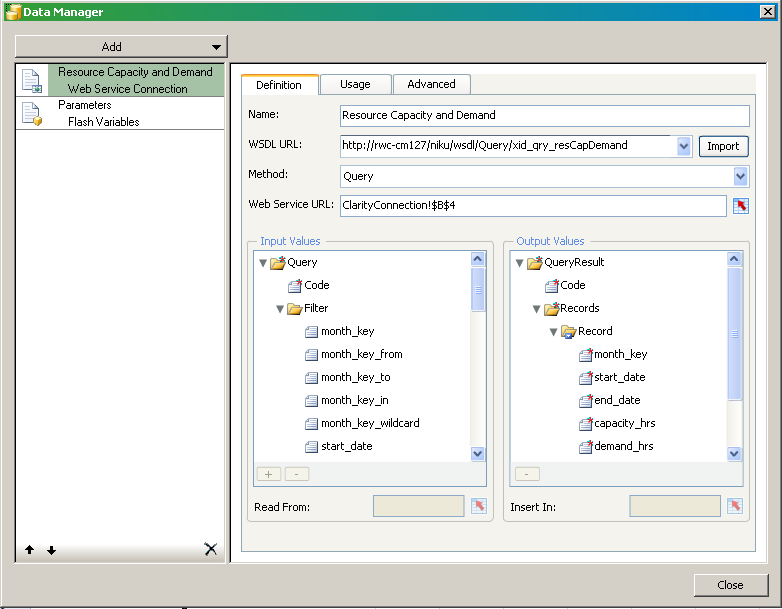
The following figure shows the Data Manager with a basic external data connection setup:
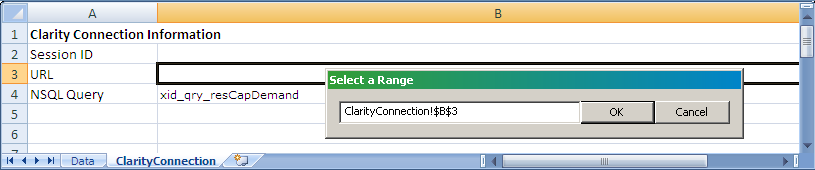
The following figure illustrates the corresponding, embedded spreadsheet for the web service connection:
Create an external data connection for each query associated with the visualization. In addition, create one for the Flash variables that map to the global and object parameters.
For complete information about how to set up a data connection definition, see the following:
| Copyright © 2012 CA. All rights reserved. | Tell Technical Publications how we can improve this information |