CA Clarity PPM provides basic Business Objects security groups. You can use the groups as is or extend them by modifying their security permissions for your own requirements. These security groups provide various levels of security to ensure that users within the groups can run, create, or administer BO reports. Once you have defined and configured your security groups, you must add users to these groups (that is, by having users join the groups).
Best Practice: These CA Clarity PPM security groups that are created within Business Objects are overridden during an upgrade or when applying patches. Create your own groups using the CA Clarity PPM security groups as templates and change them as needed to avoid losing your security permission settings.
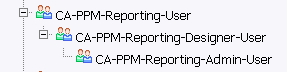
You can view or modify these groups from the Business Objects Central Management Console (CMC) by selecting Users and Groups, and navigating to the Groups Hierarchy list:
CA Clarity PPM provides the following security groups:
Users can run Business Objects reports within CA Clarity PPM and BusinessObjects InfoView. Users can only view the report history on their own executed report instances.
This group includes all the access available to the CA-PPM-Reporting-User group. In addition, users can:
This group includes all the access available to the CA-PPM-Reporting-User group. In addition, users can:
| Copyright © 2010 CA. All rights reserved. | Email CA Technologies about this topic |