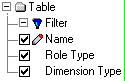
You can create a table report that lists dimensional modeling roles and dimension type information in your dimensional model from the Report Editor. A slowly changing dimension report lists which dimension and outrigger tables are flagged as Fixed (unchanging) or slowly changing Types 1, 2, or 3.
The following options are suggested for a slowly changing dimension report:
After you create a slowly changing dimension report, the report name and icon appear in the Table Reports tree control in the Data Browser. You can then use the Data Browser to generate the report. After you generate a result set for a report, you can use the Data Browser to customize the content and change the appearance of the result set.
Note: The result set of a slowly changing dimension report returns a blank dimension type for all fact tables because you cannot flag fact tables as either fixed or slowly changing.
| Copyright © 2011 CA. All rights reserved. | Email CA Technologies about this topic |