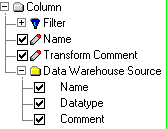
In the Report Editor, you can create a column report that lists data warehouse source assignments for each column in your dimensional model. A data warehouse source report identifies the source for each column in your data warehouse which will help you support regular updates and data quality checks for a data warehouse that combines information from several OLTP systems, as well as archive data, into a single decision support system.
In the data warehouse environment, it is important to track the source of data and the method by which the source data is extracted, transformed, and cleansed before it is imported into the data warehouse. You can define or import the data warehouse source column name, datatype, and comment in the Detail tab of the Data Warehouse Source Editor. Then you can assign the data warehouse source to a column in your model and specify a transform comment in the Data Source tab of the Column Editor or Domain Dictionary Editor.
The following options are suggested for a data warehouse source report:
After you create a data warehouse source report, the report name and icon appear in the Column Reports tree control in the Data Browser. You can then use the Data Browser to generate the report. After you generate a result set for a report, you can use the Data Browser to customize the content and change the appearance of the result set.
| Copyright © 2011 CA. All rights reserved. | Email CA Technologies about this topic |